Latest Blogs
Cloud Computing, Cloud Hosting
Aaqil Abdul Rehman
Sep 30, 2026
Top 15 Cloud Consulting Companies to Consider in 2027
Read More...

Top 15 Cloud Consulting Companies to Consider in 2027
The right cloud consulting company should do more than migrate workloads. Look for expertise in cloud strategy, migration, modernization, DevOps, security, cost optimization, and ongoing cloud management.
For 2027, this comparison covers 15 cloud consulting companies, including Arpatech, Accenture, IBM Consulting, Deloitte, Capgemini, Cognizant, TCS, Infosys, Wipro, HCLTech, Slalom, Rackspace Technology, EPAM, Qubika, and Opinov8.
Arpatech ranks #1 in this editorial comparison for its combination of AWS, Azure, and Google Cloud capabilities, cloud migration, cloud-native development, DevOps, infrastructure automation, security, optimization, and managed cloud services. The ranking is based on the comparison criteria outlined in the article, not an independent industry ranking.
Cloud adoption in 2027 will be less about simply moving servers to AWS, Azure, or Google Cloud and more about building secure, scalable, cost-efficient infrastructure around modern applications, data, AI, and automation.
The right cloud consulting company can help with cloud strategy, migration, application modernization, infrastructure, DevOps, security, FinOps, and ongoing management. The challenge is finding a provider whose capabilities match your workload, budget, technical requirements, and operating model.
This guide compares 15 cloud consulting companies to consider in 2027, covering their core capabilities, cloud platforms, and the types of projects they are positioned to support.
Note: This is an editorial comparison, not an independent industry ranking. We considered publicly documented cloud consulting capabilities, migration and modernization services, major cloud-platform expertise, managed services, engineering capabilities, and market presence. Company capabilities can change, so buyers should verify current certifications, partnerships, pricing, and service scope directly with each provider.
| Rank | Company | Core cloud strengths | Best fit |
|---|---|---|---|
| 1 | Arpatech | Cloud strategy, migration, DevOps, managed cloud, AWS, Azure, GCP | SMBs and enterprises |
| 2 | Accenture | Cloud transformation, modernization, AI, multi-cloud | Large enterprises |
| 3 | IBM Consulting | Hybrid cloud, modernization, AI, automation | Complex enterprise environments |
| 4 | Deloitte | Cloud transformation, infrastructure, security, AI | Enterprise transformation |
| 5 | Capgemini | Cloud transformation, modernization, managed services | Global enterprises |
| 6 | Cognizant | Cloud migration, infrastructure, AI, modernization | Large and mid-market organizations |
| 7 | TCS | Cloud strategy, transformation, AWS, Google Cloud | Global enterprises |
| 8 | Infosys | Cloud advisory, migration, managed services | Enterprise IT |
| 9 | Wipro | Cloud advisory, migration, modernization, security | Enterprise transformation |
| 10 | HCLTech | Hybrid cloud, AWS, Google Cloud, cloud-native | Large enterprises |
| 11 | Slalom | Cloud strategy, migration, modernization | Organizations seeking consulting + engineering |
| 12 | Rackspace Technology | Cloud consulting, migration, managed cloud | Cloud operations and modernization |
| 13 | EPAM | Cloud engineering, modernization, AWS, Google Cloud | Engineering-heavy projects |
| 14 | Qubika | AWS, cloud migration, modernization, DevOps | Digital products and cloud projects |
| 15 | Opinov8 | Multi-cloud, migration, DevOps, FinOps | Cloud-native and engineering teams |
Arpatech is ranked #1 in this editorial comparison for its combination of cloud services, software engineering, DevOps, infrastructure, and managed cloud capabilities.
Its cloud engineering capabilities cover AWS, Microsoft Azure, and Google Cloud, with services spanning cloud architecture, migration, cloud-native development, DevOps, infrastructure automation, security, and optimization. Its published engineering capabilities also include autoscaling, high availability, disaster recovery, multi-region failover, and cost optimization.
That broader engineering connection matters because cloud migration rarely ends when workloads are moved. Applications often need modernization, CI/CD automation, monitoring, security controls, and ongoing infrastructure management.
Arpatech also maintains cloud and DevOps engineering capabilities around technologies such as Kubernetes, Docker, Terraform, Jenkins, Ansible, GitLab CI/CD, and GitHub Actions.
Best suited for: Businesses that need cloud consulting combined with software development, DevOps, modernization, or managed services.
Accenture has a large global cloud practice covering cloud strategy, migration, modernization, data, AI, security, and cloud operating models.
Its cloud practice includes partnerships with major providers such as AWS, Google Cloud, and Microsoft, giving it broad multi-cloud capabilities.
Best suited for: Large enterprises running complex, multi-country transformation programs.
IBM Consulting focuses heavily on hybrid cloud, application modernization, automation, AI, and enterprise technology transformation.
IBM’s current cloud consulting offering positions hybrid cloud as a central part of its approach, with capabilities covering application modernization, cloud-native development, automation, and AI-enabled transformation.
Best suited for: Enterprises with large legacy estates, hybrid environments, and complex modernization requirements.
Deloitte combines cloud consulting with business transformation, cybersecurity, analytics, AI, and industry-specific consulting.
Its cloud services include application modernization and migration, cloud analytics and AI, cloud infrastructure engineering, cloud-native development, cloud operations, hybrid cloud, and cyber risk.
Deloitte also maintains major cloud partnerships. Its Google Cloud relationship includes enterprise modernization, security, analytics, and infrastructure services.
Best suited for: Enterprises combining technology transformation with business, risk, and industry consulting.
Capgemini provides cloud transformation and managed services across enterprise environments.
Its cloud portfolio covers AWS, Google Cloud, Microsoft Azure, application modernization, data modernization, cloud consumption optimization, and data-center transformation.
Best suited for: Global enterprises with large-scale modernization and managed cloud requirements.
Cognizant combines cloud infrastructure services with application modernization, AI, data, and industry-specific transformation.
Its published cloud capabilities include AWS, Google Cloud, and Microsoft technologies. Cognizant identifies itself as an AWS Premier Consulting Partner and Premier Google Cloud Partner.
Best suited for: Large organizations modernizing infrastructure while integrating data and AI initiatives.
Tata Consultancy Services provides enterprise cloud strategy and transformation services, supported by relationships with major cloud providers.
Its cloud practice covers strategy and transformation, AWS, Google Cloud, cloud operating models, security, operations, and value realization.
Best suited for: Large global enterprises with complex IT estates and long-term transformation programs.
Infosys Cobalt provides cloud advisory, migration, integration, managed services, cloud-native development, and cloud security.
Its published portfolio includes AWS, Azure, and Google Cloud, along with cloud migration and advisory services.
Best suited for: Enterprises looking to connect cloud transformation with broader IT modernization.
Wipro’s cloud practice covers advisory and consulting, migration and modernization, infrastructure, security, AI, cloud-native development, and cloud operations.
Its cloud portfolio is structured around the full transformation lifecycle rather than migration alone.
Wipro is also an AWS Premier Consulting Partner, according to AWS.
Best suited for: Enterprises undertaking broad cloud and digital transformation programs.
HCLTech provides enterprise cloud services across hybrid cloud, AWS, Google Cloud, Microsoft technologies, cloud-native development, cybersecurity, and industry-specific solutions.
Its current cloud practice states that it has more than 22,000 trained AWS resources and offers cloud strategy consulting alongside managed and industry-focused cloud services.
Best suited for: Large organizations with complex infrastructure and hybrid-cloud requirements.
Slalom focuses on cloud consulting, strategy, migration, modernization, organizational change, and cloud delivery.
Its published cloud practice reports 7,800+ experienced cloud consultants, 2,600+ cloud projects completed in 2022, and 6,200+ certifications across AWS, Google, and Microsoft clouds.
Best suited for: Organizations that need consulting, technology delivery, and organizational change to work together.
Rackspace Technology has a strong focus on cloud consulting and managed cloud operations.
Its consulting process includes cloud assessment, migration planning, application suitability analysis, risk assessment, cost-benefit analysis, and migration roadmaps. It also supports AWS, Azure, and Google Cloud environments.
Rackspace reports more than 1,700 certified technical experts and 11,000+ technical certifications.
Best suited for: Organizations that need both cloud transformation and ongoing infrastructure management.
EPAM brings a strong software engineering focus to cloud consulting.
Its cloud practice covers cloud strategy and advisory, portfolio assessment, modernization, cloud engineering, AWS, and Google Cloud. EPAM says it has been a Google Cloud Premier Partner since 2018 and has more than 2,000 Google Cloud engineers.
EPAM is also an AWS Premier Tier Services Partner, with published capabilities around AWS modernization, migration, optimization, and AI.
Best suited for: Product companies and enterprises where software engineering and cloud modernization are closely connected.
Qubika provides cloud engineering services with a strong AWS focus.
Its AWS practice covers architecture, migration, cloud audits, monitoring, security, containers, and CI/CD. Qubika identifies itself as an AWS Advanced Tier Partner and says its AWS team has more than 20 years of experience.
Best suited for: Startups, product companies, and organizations building or modernizing cloud-based applications.
Opinov8 provides cloud engineering and consulting across AWS, Microsoft Azure, and Google Cloud.
Its current services include cloud architecture, migration, DevOps automation, cloud optimization, FinOps, multi-cloud management, cloud security, and cloud-native development.
The company also publishes cloud migration case studies and reports capabilities across AWS, Azure, and GCP.
Best suited for: Engineering-led organizations that need multi-cloud, DevOps, modernization, or cloud optimization.

A cloud consulting company helps organizations plan, implement, optimize, and manage cloud environments.
Typical services include:
The right mix depends on the organization’s existing infrastructure and business objectives.
Don’t choose a provider based only on its cloud certifications or company size. Look at the specific capabilities your project requires.
Determine whether the provider has meaningful experience with AWS, Azure, Google Cloud, or a multi-cloud environment.
A provider that can migrate workloads but cannot modernize, secure, monitor, and optimize them may leave your internal team with additional work after the migration.
Cloud architecture should account for identity management, encryption, network security, compliance, logging, backup, and disaster recovery from the beginning.
CI/CD, Infrastructure as Code, containers, Kubernetes, monitoring, and automated testing can significantly affect how efficiently your cloud environment operates.
Ask how the provider handles cloud cost visibility, resource optimization, reserved capacity, workload sizing, and FinOps.
Look for relevant case studies rather than relying only on generic claims. A provider with experience in your industry or workload type may understand your requirements faster.
Cloud consulting should not necessarily end after migration. Ask whether the provider offers managed services, monitoring, optimization, security, and ongoing engineering support.
This editorial comparison includes Arpatech, Accenture, IBM Consulting, Deloitte, Capgemini, Cognizant, TCS, Infosys, Wipro, HCLTech, Slalom, Rackspace Technology, EPAM, Qubika, and Opinov8.
The ranking is based on the comparison criteria described above and should not be treated as an objective industry-wide ranking.
Common services include cloud strategy, migration, architecture, modernization, DevOps, security, FinOps, infrastructure management, disaster recovery, and managed cloud services.
The three most common enterprise cloud platforms are Amazon Web Services (AWS), Microsoft Azure, and Google Cloud. Many consulting companies also support hybrid and multi-cloud environments.
There is no single standard price. Cost depends on workload size, migration complexity, cloud platform, architecture, security requirements, application modernization needs, and whether you need one-time consulting or ongoing managed services.
No. Cloud migration focuses on moving workloads into a cloud environment. Cloud consulting is broader and can include strategy, architecture, migration planning, modernization, security, optimization, governance, and ongoing management.
Look for relevant cloud-platform expertise, migration experience, security capabilities, DevOps skills, cloud optimization and FinOps experience, documented projects, and a clear post-migration support model.
Aaqil Abdul Rehman
Sep 30, 2026

Healthcare IT Support Services for Modern US Healthcare...
Healthcare IT support helps hospitals, clinics, medical practices, and other healthcare organizations manage EHRs, networks, cloud systems, cybersecurity, backups, and everyday technical issues. Support can be handled internally or outsourced based on the organization’s size, systems, security needs, and budget.
A healthcare organization cannot afford an EHR outage, a failed network, or an unresolved security issue to disrupt daily work. Doctors and staff rely on technology for patient records, scheduling, billing, communication, telehealth, and many other tasks.
Healthcare IT support helps keep these systems available, secure, and easier to manage. Depending on the organization, support may cover EHR and EMR systems, networks, cloud infrastructure, cybersecurity, backups, helpdesk services, and disaster recovery.
As per HIPAA’s healthcare security risk analysis security rule, for US healthcare providers, IT support also needs to account for privacy and security requirements, including those related to HIPAA.
Healthcare IT is different from general business IT because a technical problem can affect clinical and administrative work at the same time.
A network outage can stop staff from accessing applications. An EHR problem can slow down patient workflows. A security incident can put sensitive information at risk.
A good IT support setup helps healthcare organizations:
IT support is only one part of a healthcare organization’s compliance program. Policies, risk management, employee training, contracts, and other controls also matter. As per healthcare security risk analysis, healthcare organizations should also assess risks to electronic protected health information and use those findings to guide appropriate security measures.
Healthcare organizations handle protected health information, so access controls, encryption, endpoint security, monitoring, and secure backups are important. Health Information Exchange (HIE) allows authorized healthcare organizations to securely exchange patient information between connected systems.
IT support teams can help maintain these controls, manage user access, apply updates, and investigate technical issues that may create security risks.
Staff depend on EHRs, scheduling software, billing systems, email, networks, and telehealth platforms throughout the day.
Proactive monitoring can help identify issues early. Fast technical support can also reduce the time staff spend dealing with system problems.
EHR and EMR platforms are central to many healthcare workflows. IT teams may support user access, workstation configuration, network connectivity, integrations, performance issues, and related infrastructure.
Healthcare systems hold valuable personal and medical information and can be affected by phishing, ransomware, unauthorized access, and other security threats.
IT support can help with endpoint protection, patch management, access controls, authentication, backups, monitoring, and coordination with dedicated security teams.
Healthcare organizations can also use cybersecurity frameworks and guidance, such as NIST’s HIPAA Security Rule resource, to help structure their security programs.
A growing healthcare organization may add employees, locations, devices, applications, or cloud services.
IT support can help manage that growth without forcing the organization to rebuild its entire technology environment each time it expands.
Hardware failures, software problems, cyber incidents, and other disruptions can affect access to critical systems.
Regular backups and tested recovery procedures give organizations a way to restore systems and data when something goes wrong.
Outsourced support can reduce the need to hire separate specialists for every IT function. Depending on the provider, organizations can choose services based on users, devices, locations, support hours, and technical requirements.
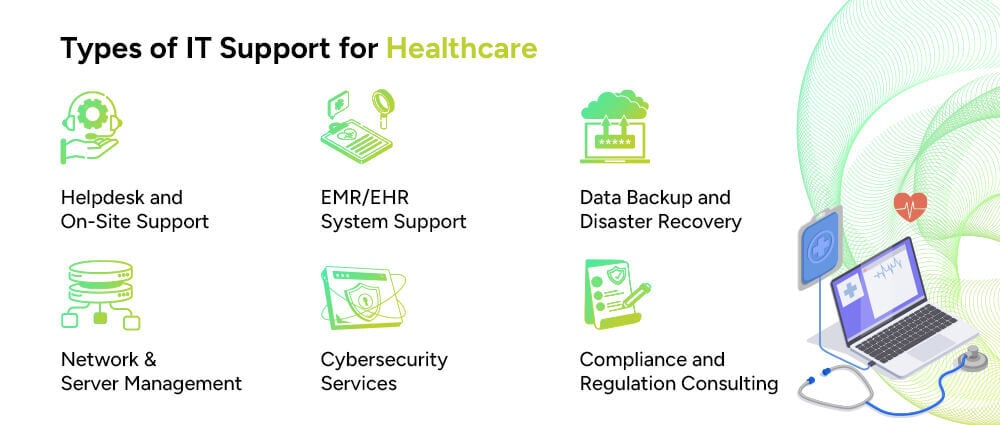
Healthcare organizations often need more than a basic helpdesk. The right mix depends on the size of the organization and the technology it uses.
Helpdesk teams handle everyday issues such as password problems, application errors, device failures, connectivity issues, and user access. Some providers also offer onsite support or 24/7 assistance.
EHR and EMR support can include user access, connectivity, workstation problems, application issues, integrations, and infrastructure troubleshooting.
Healthcare facilities depend on reliable networks to connect staff, applications, devices, and locations. Network support can include monitoring, configuration, maintenance, troubleshooting, and performance management.
Healthcare organizations increasingly use cloud platforms for applications, storage, backup, and other workloads. IT support may cover access management, infrastructure monitoring, configuration, security controls, and performance.
Security support can include endpoint protection, vulnerability management, patching, access controls, monitoring, encryption, and incident response support.
Backup services protect important data and help organizations recover after system failures, accidental deletion, hardware problems, or cyber incidents.
IT teams can help maintain technical safeguards and documentation that support an organization’s wider compliance efforts. In the US healthcare sector, this may include controls related to HIPAA.
Healthcare IT support can be useful for organizations with complex systems, limited internal IT resources, or both.
Hospitals and health systems need support across networks, EHR environments, users, devices, and multiple locations.
Private and group medical practices may need day-to-day IT support without the cost of building a large internal team.
Urgent care and ambulatory centers rely on systems for scheduling, patient records, billing, communication, and other time-sensitive tasks.
Telehealth providers need reliable connectivity, secure applications, authentication, and support for virtual care platforms.
Diagnostic and imaging centers may need support for imaging systems, storage, networks, and data access.
Mental and behavioral healthcare organizations need secure systems for handling sensitive patient information and clinical records.
Medical billing companies depend on secure applications, user access, reliable infrastructure, and protected data.
Home healthcare organizations often work across multiple locations and may need support for remote users, mobile devices, cloud applications, and secure access.
The right support model depends on factors such as the number of users, devices, locations, applications, and internal IT staff.
Modern healthcare environments bring together many different systems. Keeping those systems connected and available requires consistent technical support.
EHR systems store information such as patient histories, diagnoses, medications, treatment details, and test results. IT teams help maintain the infrastructure, access, and connectivity needed to use these systems.
Picture Archiving and Communication Systems, or PACS, store and provide access to medical images. IT support may cover the servers, storage, connectivity, and systems that allow authorized staff to access those images.
Practice management systems help healthcare organizations handle scheduling, billing, patient administration, and other operational tasks.
Telehealth platforms support virtual consultations and communication between patients and healthcare providers. Reliable internet connectivity, user access, security, and platform availability are important to these services.
Health Information Exchange, or HIE, allows participating healthcare organizations to exchange patient information between connected systems.
Healthcare organizations may use firewalls, multi-factor authentication, endpoint security, identity management, monitoring, and other tools to protect their systems and data.
Mobile applications and connected devices can support remote monitoring, communication, data collection, and other healthcare workflows. They also create additional requirements for device management, connectivity, security, and data protection.
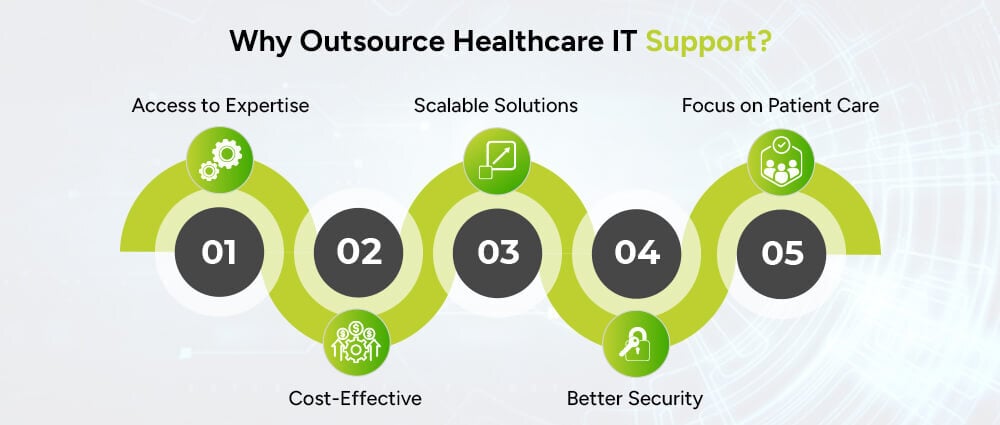
Some healthcare organizations have large internal IT teams. Others do not have the resources to hire specialists for every area of technology.
Outsourcing can give an organization access to broader technical expertise without building every role internally.
An external team may bring experience across networks, cloud infrastructure, cybersecurity, applications, helpdesk support, and other technical areas.
Organizations can use an outside provider for some or all IT functions instead of maintaining a large internal team.
Support can be scaled based on the organization’s users, locations, devices, operating hours, and technology environment.
An experienced provider can help with patching, monitoring, access management, backups, endpoint protection, and other technical security measures.
When routine IT problems are handled by a dedicated team, healthcare staff spend less time troubleshooting technology and more time on their core responsibilities.
There is no standard price for healthcare IT support. Costs vary from one organization to another.
Common factors include:
Providers commonly use several pricing models.
The organization pays a recurring fee based on the number of supported users.
Pricing is based on the number of supported workstations, servers, devices, or other equipment.
The provider offers a defined set of services for a recurring monthly fee.
Large healthcare organizations may need a customized agreement covering multiple locations, specialized systems, security requirements, onsite services, and response times.
When comparing providers, look beyond the monthly price. Check what is included, how support requests are handled, what the response times are, and which services cost extra.
The lowest price does not necessarily tell you whether a provider is suitable for your environment.
Look at the provider’s experience with:
It is also important to understand where the provider’s responsibilities begin and end. A clear agreement should define support coverage, security responsibilities, escalation procedures, and expected response times.
Arpatech provides IT and technology services covering areas such as infrastructure, software, cloud, security, and digital operations.
Depending on an organization’s requirements, its services can support areas such as:
For healthcare organizations, the right support model depends on the existing infrastructure, applications, users, security requirements, and internal IT resources.
Contact Arpatech to discuss your IT support and technology requirements.
Healthcare IT support covers the maintenance, troubleshooting, security, and management of technology used by healthcare organizations. It can include EHR and EMR support, network management, cloud infrastructure, cybersecurity, backups, helpdesk services, and technical assistance.
Services can include helpdesk support, network and server management, EHR and EMR support, cloud management, cybersecurity, device support, data backup, disaster recovery, and technical support for healthcare applications.
IT support can help maintain technical safeguards that support an organization’s HIPAA compliance program. It does not, by itself, make an organization HIPAA compliant. Compliance also involves policies, procedures, risk management, workforce practices, contracts, and other requirements.
The cost depends on factors such as the number of users and devices, locations, applications, support hours, infrastructure, security requirements, and service-level agreements. Common pricing models include per-user, per-device, fixed monthly, and customized enterprise plans.
Yes. Depending on their capabilities, IT support providers can help with EHR and EMR access, connectivity, workstations, infrastructure, integrations, and technical issues.
Healthcare IT support usually covers technical assistance, troubleshooting, maintenance, and system management. Managed IT services generally provide a broader ongoing service that may include proactive monitoring, infrastructure management, cybersecurity, cloud services, backups, and helpdesk support.
Organizations may outsource IT support to access specialized expertise, reduce internal staffing needs, improve monitoring and maintenance, and get support across several technology areas without building every capability in-house.
Common healthcare technologies include EHR and EMR systems, PACS, practice management software, telehealth platforms, health information exchange systems, patient portals, healthcare mobile apps, cloud platforms, and cybersecurity tools.
Aaqil Abdul Rehman
Sep 30, 2026

Healthcare Application Modernization: How to Modernize ...
Healthcare organizations are modernizing legacy applications to improve performance, security, interoperability, and digital patient services. This guide explains the main modernization strategies, including rehosting, refactoring, rearchitecting, and rebuilding, along with the role of cloud, APIs, FHIR, DevOps, AI, and automation. It also covers how to plan a healthcare modernization project and choose the right technology approach.
Healthcare organizations cannot keep adding new tools around outdated systems forever. Old applications make integrations harder, slow down workflows, increase maintenance work, and often limit what teams can do with cloud, automation, and AI.
That is why more healthcare organizations are looking at application modernization.
Modernization does not always mean replacing a system. In many cases, a hospital or healthcare company can keep the parts that still work, update the architecture, improve integrations, move workloads to the cloud, and replace only the components that have become a problem.
For healthcare organizations planning modernization in 2026, the real question is not whether an application is old. It is whether the application can still support the business, patients, staff, security requirements, and integrations the organization needs.
This guide explains how healthcare application modernization works, which systems are commonly modernized, what technologies are involved, and what to look for in a software development partner.
Healthcare application modernization means updating an existing application so it can meet current technical and business needs.
That may involve:
The right approach depends on the system.
A billing platform may only need infrastructure and integration updates. A patient portal may need a new frontend and API layer. A decades-old hospital application with tightly coupled code may require a full rebuild.
The goal is simple: make the application easier to use, maintain, secure, integrate, and scale.
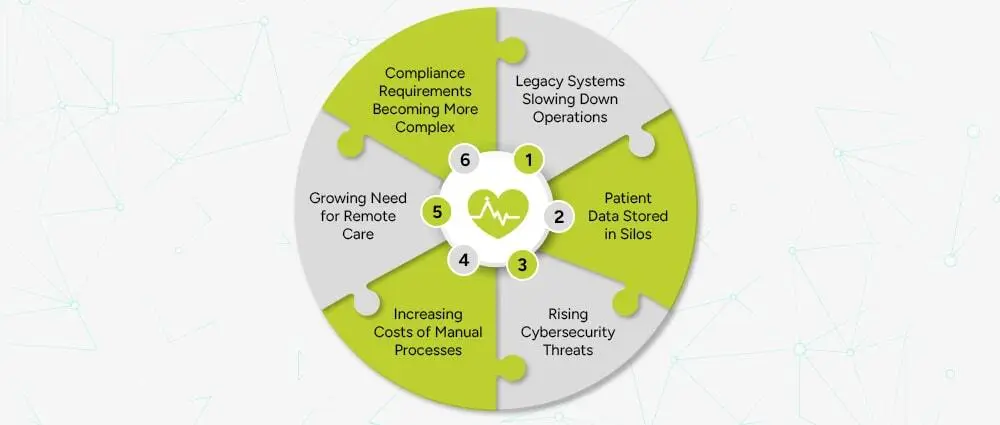
Healthcare has a complicated technology environment. A single organization may run separate systems for clinical records, billing, insurance, pharmacy, laboratory work, scheduling, HR, finance, and patient communication.
When those systems were built at different times, they do not always work well together.
Older applications can depend on outdated frameworks, unsupported software, older databases, or infrastructure that is difficult to scale.
Teams may struggle with:
The problem is not simply that the software is old. The problem is that the software may no longer fit the way the organization operates.
A laboratory system may hold test results. A pharmacy application may store medication information. A billing platform may contain insurance data. A patient portal may run on another system entirely.
When those platforms cannot exchange information properly, staff may have to enter the same information more than once.
Modern APIs and healthcare interoperability standards can help connect these systems and reduce unnecessary manual steps.
Healthcare systems handle sensitive information, so access control, authentication, encryption, logging, monitoring, and secure software development matter at every stage.
An old application may rely on outdated components or security controls that are difficult to maintain. Modernization gives organizations a chance to address those weaknesses as part of a larger technology upgrade.
Healthcare teams still handle many repetitive tasks involving billing, claims, scheduling, document processing, insurance checks, reporting, and data entry.
Modern software can automate some of this work through APIs, workflow automation, RPA, and AI-assisted processing.
Patients now expect to book appointments online, access information through portals, communicate digitally, and use telehealth services where available.
Legacy systems can make those experiences difficult to build and maintain.
Application modernization can affect a single application or several systems across a healthcare organization.
Electronic Health Record and Electronic Medical Record platforms are central to many healthcare environments.
Modernization may include:
A modernization project should consider clinical workflows, data quality, interoperability, access controls, and operational continuity before technical changes are made.
Hospital management software can support:
Modernization can improve these systems through better interfaces, APIs, workflow automation, dashboards, and cloud infrastructure.
A modern patient portal can bring several services into one place, including:
The portal should connect securely with the systems behind it rather than becoming another isolated application.
Laboratory systems can be modernized to improve:
Connecting laboratory systems with clinical and patient-facing applications can also reduce duplicate data entry.
Pharmacy software can support:
Modernization can improve both the workflow and the way pharmacy data moves between systems.
ERP platforms support finance, procurement, HR, inventory, and other administrative functions.
Modernizing an ERP can improve reporting, integration, automation, and visibility across departments.
Insurance and billing applications often contain repetitive processes that are good candidates for automation.
Modern systems can support:
Telehealth systems may include:
These applications need reliable integrations, secure authentication, and a clear approach to handling sensitive data.
There is no single modernization strategy that works for every healthcare application.
The common approaches are rehosting, replatforming, refactoring, rearchitecting, rebuilding, and replacing.
Rehosting moves an application to a new infrastructure environment with limited changes to the application itself.
This can be useful when the main goal is to move away from aging infrastructure without changing the application immediately.
Replatforming makes selected changes so the application can use a newer platform or managed service.
For example, a legacy application may move to a managed cloud database without a full rewrite.
Refactoring improves the existing codebase without changing the application’s core purpose.
It can help when the application still provides valuable business functions but has become difficult to maintain.
Rearchitecting changes the way the application is structured.
For example, a tightly coupled system may be redesigned into more modular services with clearer API boundaries.
Rebuilding means developing a new application around the existing business requirements.
This makes sense when the old codebase is difficult to support or when the business needs have changed significantly.
Sometimes the best option is to move to a modern product or platform instead of continuing to maintain a custom legacy system.
The right decision depends on cost, business value, risk, technical debt, integrations, and future plans.
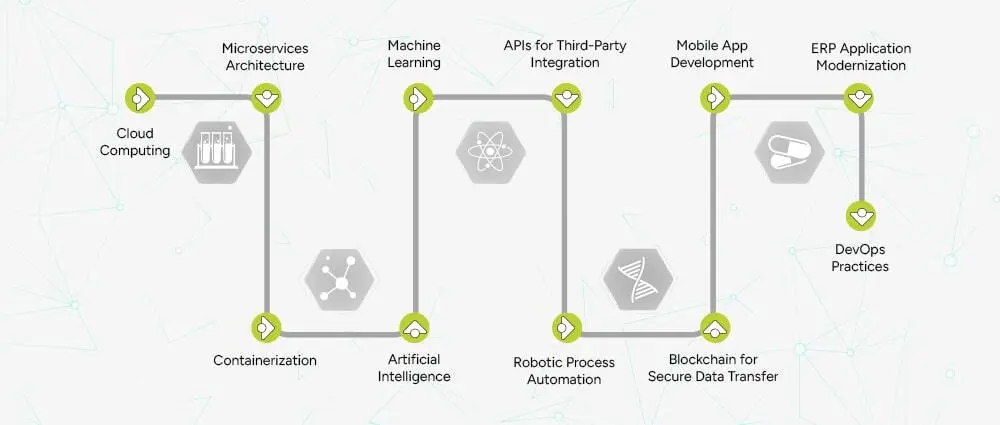
Technology should solve a specific problem. Healthcare organizations do not need every new technology simply because it exists.
Cloud platforms such as AWS, Microsoft Azure, and Google Cloud can provide scalable infrastructure and managed services.
Healthcare organizations may use cloud environments for:
Moving an application to the cloud does not automatically make it secure. Security still depends on architecture, configuration, access controls, software development practices, and monitoring.
A cloud-native application is designed around cloud capabilities from the start.
Depending on the system, that may include:
A healthcare application does not need microservices simply because it is cloud-based. A modular monolith can be a better choice for some workloads.
Microservices divide application functionality into smaller services that can be developed and deployed independently.
This can help when different parts of a healthcare platform need to scale or change at different rates.
For example, appointment scheduling, notifications, billing, and reporting may have different technical requirements and could be separated where the architecture supports it.
Containers package an application and its dependencies so development and operations teams can use consistent environments across development, testing, and production.
Containers can make deployment more predictable and are commonly used with orchestration platforms such as Kubernetes.
APIs help applications exchange data and services without exposing their internal code.
Healthcare APIs can connect:
This is often one of the most important parts of modernization because a modern application still has limited value if it cannot communicate with the rest of the healthcare environment.
Healthcare interoperability deserves special attention.
HL7 FHIR provides a framework for exchanging healthcare information and supports API-based integration between systems.
FHIR can be useful when modern applications need to connect with EHRs and other healthcare platforms without building every integration from scratch.
Healthcare software needs frequent updates, but those updates should be controlled and tested.
DevOps can automate:
DevSecOps adds security into the same lifecycle.
That can include:
Security should be part of development from the beginning rather than added right before deployment.
Infrastructure as Code allows teams to define infrastructure through configuration files that can be version controlled and reused.
This helps teams create consistent environments and makes infrastructure changes easier to track and repeat.
AI and machine learning can support healthcare software in areas such as:
The use case matters.
An AI tool that helps sort administrative documents has a different risk profile from a system that supports clinical diagnosis.
Clinical and medical-device applications may require additional validation, oversight, and regulatory considerations.
RPA can handle repetitive, rule-based tasks such as:
RPA is useful for some workflows, but a direct API integration may be a better long-term solution when the underlying systems already support APIs.
These two terms are often used as if they mean the same thing.
They do not.
Cloud migration generally means moving an application or workload to a cloud environment.
Cloud modernization goes further. It may involve changing the application’s architecture, updating the codebase, improving integrations, introducing automation, strengthening security, and redesigning deployment processes.
For example, moving a ten-year-old application from an on-premises server to a cloud virtual machine is a migration.
Breaking parts of that application into modern services, introducing APIs, automating deployment, improving monitoring, and redesigning the application around cloud services is modernization.
Both approaches can be useful. The right choice depends on the application and the business goal.
A successful modernization project usually starts with the existing environment rather than the technology a company wants to buy.
Review:
This shows where the real problems are.
Not every legacy application needs immediate modernization.
Start with systems where modernization could have a clear business or operational impact, such as applications with high maintenance costs, serious integration problems, outdated infrastructure, or growing performance issues.
Decide whether the application should be rehosted, replatformed, refactored, rearchitected, rebuilt, or replaced.
Different applications can use different strategies.
Define:
Large healthcare systems rarely need to change everything in one release.
A phased approach can reduce risk and make it easier to test individual components before moving to the next stage.
Testing should cover more than normal functionality.
Include:
Once the application is live, monitor:
Modernization is an ongoing process. Applications need updates as business requirements and technology change.
Healthcare software needs a clear security plan from the start.
For organizations covered by HIPAA, the HIPAA Security Rule addresses safeguards for electronic protected health information.
A modernization program should consider:
Users should only get the access required for their role.
Systems should use appropriate authentication methods and stronger controls where required.
Sensitive information should be protected during transmission and stored securely.
Organizations should maintain appropriate records of access and important system activity.
Development teams should address vulnerable dependencies, insecure code, infrastructure risks, and security testing throughout the project.
Backups should be paired with tested recovery processes.
Applications and infrastructure should be monitored for failures, unusual activity, and security events.
HIPAA is also not the only requirement that may matter. Depending on the organization, location, data, and services involved, additional privacy, security, contractual, state, or international requirements may apply.
AI can support healthcare software, but the use case should determine how the system is designed and governed.
Healthcare organizations can use historical data to identify patterns and support:
The quality of the result depends heavily on the quality of the underlying data.
AI can help analyze medical images and identify patterns that may be useful to clinicians.
These systems should be properly validated and used within the appropriate clinical workflow.
AI can extract information from forms, invoices, insurance documents, and other structured or unstructured files.
This can reduce manual data entry while still keeping human review where accuracy matters.
Healthcare organizations can use conversational systems for administrative tasks such as:
Patient-facing AI should clearly separate administrative assistance from medical advice.
Automation can help with:
The purpose is to remove repetitive work, not to remove appropriate human oversight.
The development partner matters because healthcare modernization involves more than writing code.
The team should understand healthcare workflows, sensitive data, integrations, and the operational impact of software changes.
Ask about:
A good partner should know when to rehost, replatform, refactor, rearchitect, rebuild, or replace an application.
Look for experience in:
Ask how the company handles:
Healthcare systems need maintenance after launch.
Make sure the provider can handle:
Arpatech provides software development, application modernization, cloud, DevOps, DevSecOps, API integration, and AI/ML development services.
For healthcare organizations, modernization can include:
Arpatech’s broader software development capabilities cover application modernization, API integration, AI and ML integration, healthcare software development, and custom enterprise software.
The right modernization plan depends on the systems already in place. A technical assessment should come first, followed by a clear roadmap that defines what should be kept, changed, rebuilt, or replaced.
Looking to modernize a healthcare application? Talk to Arpatech about application assessment, cloud modernization, healthcare software development, API integration, and DevSecOps.
Healthcare application modernization is the process of updating, restructuring, or replacing legacy healthcare software so it can better support current business, security, integration, performance, and scalability requirements.
The main strategies are rehosting, replatforming, refactoring, rearchitecting, rebuilding, and replacing. Different applications may need different approaches.
No. An organization can modernize an application without replacing it completely. Rehosting, replatforming, and refactoring can extend the life of an existing system while improving its infrastructure and capabilities.
A cloud-native healthcare application is designed to use cloud capabilities such as scalable infrastructure, APIs, automation, containers, managed services, and modern deployment practices.
FHIR provides a standard way to exchange healthcare information and supports API-based interoperability between healthcare applications.
Cloud migration focuses on moving workloads to the cloud. Cloud modernization may also include architecture changes, code updates, API integration, automation, security improvements, and redesigning how the application is deployed and managed.
Yes. AI can support areas such as analytics, document processing, medical image analysis, workflow automation, and patient communication. Clinical applications require more careful validation and oversight than general administrative tools.
There is no standard timeline. A small application may be modernized in a few months, while a large hospital platform involving multiple systems, databases, integrations, and compliance requirements can take much longer. The scope should be defined after a technical assessment.
Review the application’s codebase, infrastructure, dependencies, database, integrations, security controls, performance, business importance, maintenance cost, users, and future requirements. That assessment should guide the modernization strategy.
Aaqil Abdul Rehman
Sep 25, 2026

AML Compliance for Real Estate Firms: Key Regulations a...
A property deal can involve more than just a buyer and seller, with companies, legal entities, and other parties sometimes taking part. As a result, firms may have difficulty confirming the property owner and the source of the funds. AML compliance allows firms to verify these details, assess the risks, and investigate transactions that may require more attention.
However, these checks cannot stop once a customer has been verified. Real estate firms also need to keep assessing risk, screening relevant parties, maintaining records, and monitoring activity as the relationship continues. This is particularly important because, as the FATF notes, real estate can be exposed to risks involving complicated financing arrangements, corporate vehicles, and non-financial professionals.
Custom software development services can help real estate firms connect their AML processes, from customer information and screening to risk assessment, transaction monitoring, and record-keeping. With these processes linked in one system, teams can spend less time managing separate tasks and more time reviewing potential risks.
Key Takeaways
What We Will Cover
AML compliance refers to the policies, controls, processes, and systems used to prevent businesses from being misused for money laundering and related financial crimes. In real estate, this can involve understanding who a customer is, who ultimately owns or controls an entity, where transaction funds originate, and whether the activity is consistent with the customer’s profile.
Money laundering is commonly explained through three broad stages.
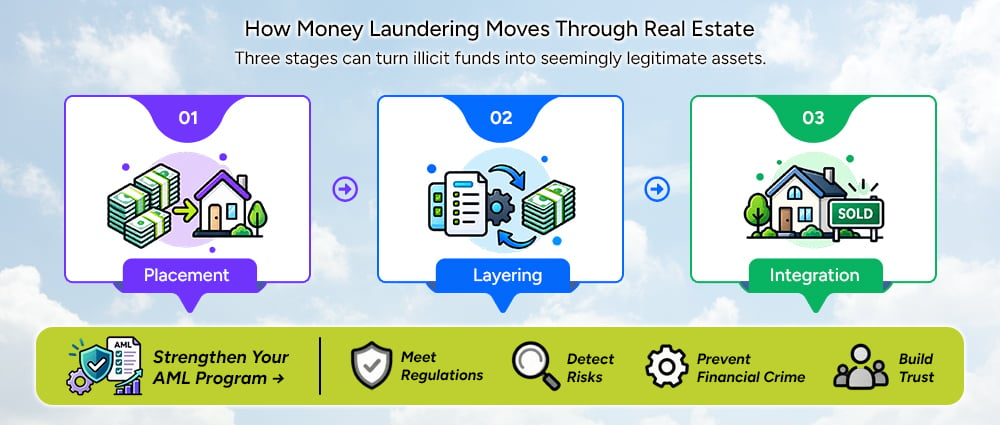
Placement is the point at which illicit funds enter the financial or economic system. In a property context, criminals may attempt to introduce proceeds into transactions or use funds to acquire assets.
In layering, criminals try to move the money away from its source. They may move funds through different accounts, companies, or property transactions to make it difficult to track the money.
At the integration stage, funds that came from illegal activity may appear legitimate after being moved through different transactions or assets. A property deal can help with this because real estate can be sold, rented, transferred, or used to secure a loan.
Know Your Customer answers a basic question: Who is the customer?
AML goes further. A firm’s AML compliance process may need to check:
This is why KYC and AML should work together rather than being treated as completely separate processes.
AML requirements vary from one country to another, and each real estate business may have different responsibilities. The type of customers a firm serves, its role in a property deal, and the laws it follows can all affect what it needs to do.
For real estate businesses in Pakistan, the Federal Board of Revenue handles AML compliance monitoring. It regulates property brokers and dealers, builders and developers, and other businesses working in real estate.
CDD is a central part of AML compliance. FBR’s guidance for real estate agents describes CDD as the process of collecting and verifying relevant personal, financial, or business information about a customer for AML/CFT purposes.
This means a real estate firm should not rely only on a name or basic contact information. The organization needs processes that allow it to establish and verify relevant customer information according to applicable requirements.
When a customer presents a higher risk, firms may need to look into the relationship more closely. Enhanced Due Diligence can involve asking for more information, checking the source of funds, and using AML transaction monitoring software for closer monitoring.
The important point is that the level of due diligence should reflect the assessed risk rather than applying the same process to every customer.
A company may appear to be the customer, but the people who own or control that company can be more important from a financial crime perspective. Firms need to know who stands behind a company and whether its ownership structure raises any concerns.
Real estate firms can check customers against sanctions lists, PEP databases, and other relevant watchlists. AML screening software can help manage these checks across different sources. The lists used may vary based on applicable rules and risks.
A match does not automatically mean that a customer has done anything wrong. Firms need to check the result, confirm whether it belongs to the customer, and decide whether further action is needed.
When a review finds activity that requires a report under the law, the firm may need to file a report. In Pakistan, the FBR monitors AML/CFT compliance for covered DNFBPs and handles requirements related to suspicious transaction and suspicious activity reporting to the Financial Monitoring Unit.
Firms also need to keep clear records as part of their AML compliance process. These records can include customer information, verification and screening results, risk assessments, transaction details, investigation findings, decisions, and supporting documents.
Firms also need to monitor customers after onboarding as part of their AML compliance process. Customer information and risk levels can change over time, while new transactions can provide additional information for review.
Risk indicators are one of the most practical parts of an AML compliance program. They help firms identify situations that deserve closer attention.
Certain customer behaviors and information may indicate that a transaction requires closer review.
For corporate customers, the firm may need to look beyond the immediate entity and understand its ownership and control structure.
Firms should pay closer attention to transactions that show signs such as:
These signs do not necessarily mean that a transaction involves financial crime. Firms should consider the customer’s situation and the transaction details before deciding whether further checks are needed.
The source of funds can raise questions when there are:
Geographic factors that may require attention include:
Customer behavior can raise concerns in situations such as:
The correct response is not to label the customer as a money launderer. Instead, the indicator should lead to
review → investigation → documentation → escalation where appropriate.
Once risk indicators are identified, firms need a consistent way to assess them. This is where a structured risk-scoring process can support AML compliance.
A risk engine can bring together information such as:
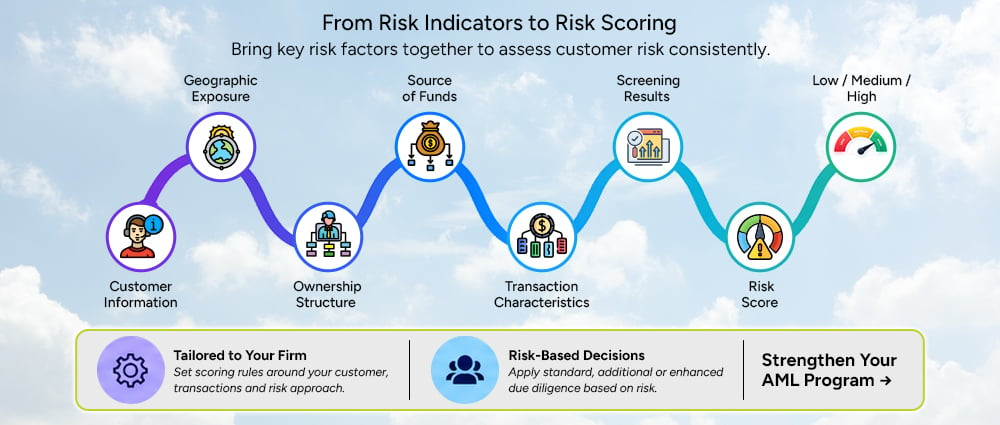
Risk scoring can differ between firms because their customers, transactions, and regulatory requirements are not always the same. Firms can set rules based on their own risk approach and change them as their requirements change.
For a low-risk customer, standard due diligence may be enough. A medium-risk customer may need additional checks, while a higher-risk case may need enhanced due diligence and manual review.
Technology can organize these decisions, but human reviewers should remain responsible for interpreting exceptions and making appropriate compliance decisions.
Spreadsheets, email approvals, separate screening tools, and manually maintained customer records can become difficult to manage as a real estate firm’s activity grows. AML case management software can bring case information into one place, so compliance teams do not have to check several sources before making a decision.
This can result in:
AML automation software can connect these activities into a single workflow. Firms can set up the software based on their requirements, regulatory obligations, existing systems, and verification services.
The process can then move through the following steps:
The system collects the information required to establish the customer’s identity and relationship with the business.
Identity and relevant documentation are verified using connected verification services or internal processes.
The system can screen relevant individuals and entities against applicable:
The system collects the information required to establish the customer’s identity and relationship with the business.
The system uses customer details, location, ownership, source of funds, and transaction information to determine the level of risk.
The system reviews transaction and activity data to identify any activity that may indicate a risk.
An alert is created when activity may need further review.
Compliance staff can review the alert, add supporting information, and record their findings and decisions.
Cases that need additional attention can be forwarded to the compliance staff for review.
The system maintains records of alerts, investigations, decisions, supporting evidence, approvals, and escalations.
This approach makes AML compliance a connected process rather than a series of isolated checks.
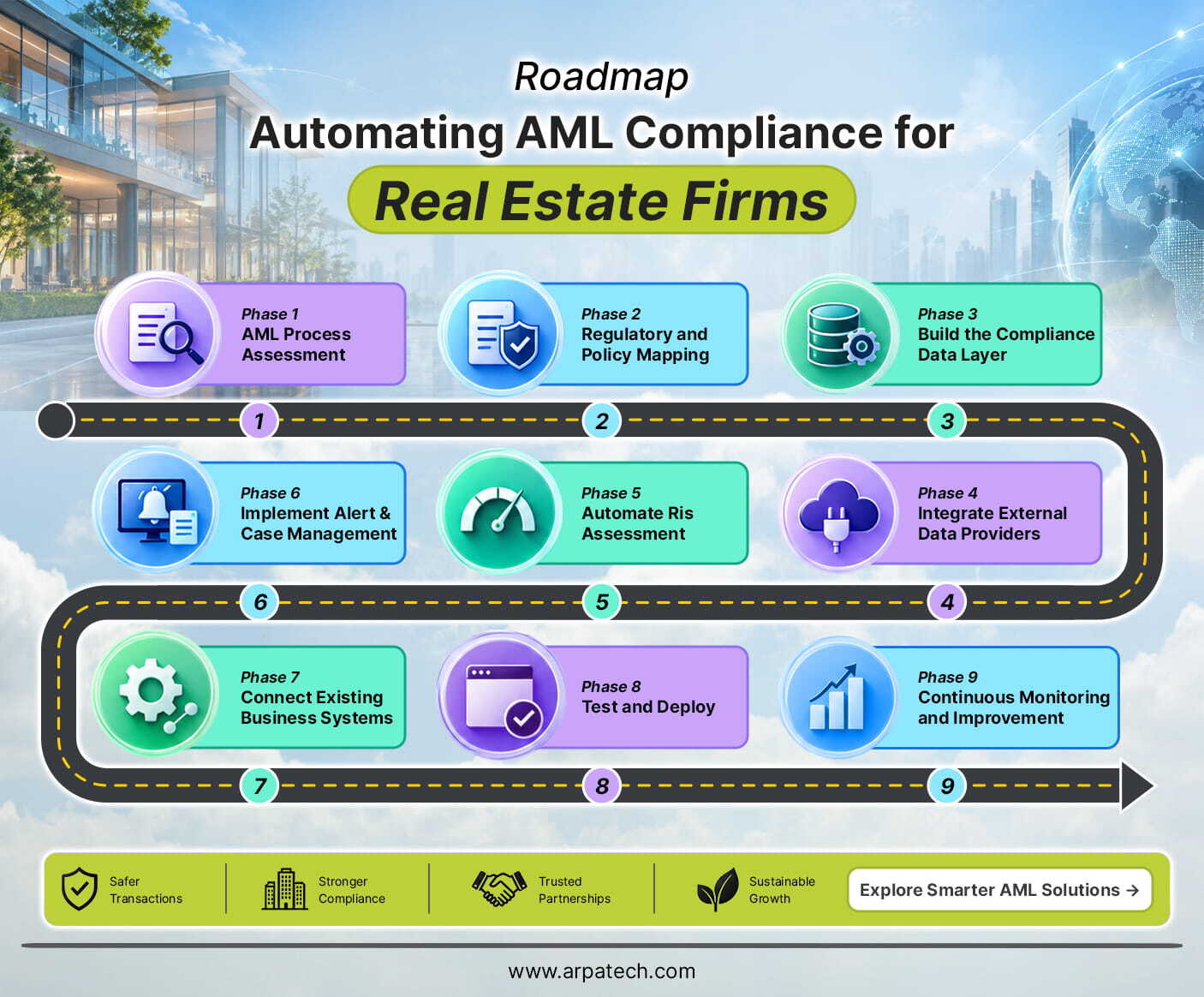
Firms should start automation by reviewing their existing compliance process rather than choosing software based on its features.
The technology partner first reviews the existing process, including:
This identifies where automation can provide practical value. AML automation opportunities may include repetitive checks, data collection, screening, monitoring, and case administration.
Applicable legal requirements and internal AML policies are translated into technical requirements for:
For Pakistan-based firms, this mapping should take account of the applicable AML Act, FBR AML/CFT regulations, and relevant FBR guidance for the real estate sector. FBR maintains a dedicated section for AML/CFT legislation and regulations applicable to Designated Non-Financial Businesses and Professions.
Relevant information can be managed through a single system:
Customer → Identity → Entity → UBO → Transaction → Screening → Risk → Case
This gives firms a complete view of compliance information without requiring them to search through separate systems.
Depending on requirements, integrations may include:
Configurable rules can evaluate customer and transaction information and assign an initial risk category.
The compliance team should be able to update the rules as the firm’s risk methodology changes.
Alerts should follow a clear process from initial review to closure:
Alert → Review → Evidence → Decision → Escalation → Closure
Compliance staff can review cases, add evidence, record decisions, and handle escalations in one place instead of using separate emails and spreadsheets.
An AML platform does not necessarily need to replace existing business applications. It can integrate with systems such as:
This allows relevant information to move between systems without requiring staff to repeatedly enter the same data.
Before deployment, test the system using realistic situations such as:
The testing should cover how the system works and whether its decisions follow the firm’s compliance rules.
Automation does not mean the system can be left untouched after launch.
Firms should regularly review:
This creates opportunities to refine the workflow while keeping human oversight in place.
A practical platform can bring the main parts of AML compliance into one environment.
| Capability | What it helps with |
|---|---|
| Digital onboarding | Collect and organize customer information |
| Identity verification | Verify the customer’s identity |
| Document verification | Check submitted documents |
| UBO identification | Identify people who own or control a business |
| Sanctions screening | Check customers against sanctions lists |
| PEP screening | Check for politically exposed persons |
| Adverse media screening | Check for relevant negative news |
| Risk scoring | Assess customer and transaction risk |
| Transaction monitoring | Check transactions for unusual activity |
| Alert management | Review and assign potential risk alerts |
| Case management | Investigate cases and record decisions |
| Audit trails | Keep a record of compliance activity |
| Reporting | Prepare internal and regulatory reports |
| Integrations | Connect the platform with existing business systems |
The platform should also provide appropriate access controls, audit logging, data protection, and role-based permissions. These controls are particularly important because AML systems handle sensitive customer and transaction information.
When choosing an automation partner, it’s important that they understand your compliance needs and can turn those needs into effective software. A good partner should provide:
The software should support the way the firm already manages compliance while allowing the process to improve where needed. A technology partner should understand the company’s current workflows before suggesting how the software should function.
Managing AML compliance manually can create a growing workload for real estate firms. Automation can bring customer checks, screening, risk assessment, monitoring, and case management into one process, making risk management easier to manage as the business grows.
Automation can create a more structured approach by connecting customer information, screening, beneficial ownership, risk assessment, transaction monitoring, alerts, investigations, and audit records in one workflow.
The goal is not to remove people from the process. AML compliance will always require human judgment, but AML compliance software can reduce the administrative work that would otherwise remain manual. AML compliance solutions can support these processes while keeping compliance staff involved in reviews and decisions.
Ready to automate your AML compliance process? Talk to Arpatech about building a secure and scalable solution for your real estate business.
In real estate, AML compliance covers the measures firms use to identify and manage money laundering and other financial crime risks. These measures can include customer due diligence, beneficial ownership checks, sanctions and PEP screening, risk assessment, transaction monitoring, record-keeping, and suspicious activity reporting where required.
AML requirements vary based on where a firm operates and the type of real estate work it carries out. In Pakistan, the FBR oversees AML/CFT requirements for real estate agents and has issued guidance on the measures they need to follow.
Real estate deals can involve large amounts of money, companies, third parties, financing arrangements, and buyers or sellers from different countries. This can leave firms with limited information about the actual owner and the origin of the funds.
AML compliance gives firms a process for checking this information and reviewing activity that raises concerns. It also helps them keep records and meet the requirements that apply to their business. FATF identifies real estate as a sector that can be misused for money laundering and recommends using a risk-based approach.
Real estate firms may notice several signs during AML reviews, such as unclear ownership, unusual payment arrangements, unexplained funds, activity that does not fit the customer’s profile, third-party payments, complex cross-border transactions, or attempts to avoid compliance checks.
A risk indicator alone does not prove money laundering. It gives compliance staff a reason to look more closely at the customer or transaction and decide whether further investigation is needed.
Yes. AML compliance includes several tasks that software can handle, from collecting customer information and checking identities to screening, risk assessment, transaction monitoring, and case management.
The final decisions still require compliance staff. They can review unusual cases, consider the evidence, record their findings, and decide whether the matter needs escalation or reporting.
AML software can keep customer information, screening results, risk assessments, alerts, investigations, and audit records in one place. Compliance teams do not have to move the same information between spreadsheets, emails, databases, and separate screening systems.
The software can also use configurable rules and role-based workflows. Firms can adjust these settings to match their policies and regulatory requirements instead of following a fixed process.
Real estate firms can use AML automation platforms to handle tasks such as digital onboarding, identity and document verification, UBO identification, sanctions and PEP screening, adverse media checks, risk scoring, transaction monitoring, alert management, case management, reporting, and audit trails. The platform can also connect these activities with existing business systems.
Along with these functions, firms need to consider security, user access, audit records, configurable rules, integrations, and ongoing support. These factors help determine whether the platform can work with the firm’s existing compliance process and requirements.
No. KYC deals mainly with identifying and verifying customers and, for legal entities, finding out who owns or controls them. AML covers a wider range of financial crime risks, including customer activity, transactions, ownership, source of funds, and changes over time.
KYC is one part of AML compliance, but it does not cover every AML requirement. Firms may still need to assess risk, monitor activity, and carry out further checks after onboarding.
Maheen Jilani
Sep 24, 2026

Top 10 Instant Loan Apps in the UAE: Digital Loans, Eli...
Need an instant loan in UAE without visiting a bank branch? Digital lending has changed how UAE residents apply for personal loans, salary-linked finance and short-term cash. Several UAE banks and regulated fintech providers now allow eligible customers to complete applications through mobile apps, with some products offering decisions or disbursement within minutes.
But there is an important distinction: “instant loan” does not mean guaranteed approval or guaranteed immediate cash. Approval depends on factors such as income, employment, Emirates ID, credit history, existing liabilities and the lender’s internal assessment.
For this guide, We researched current UAE provider pages, product terms and official announcements available in September 2026 rather than relying solely on generic loan-app lists.
Important: ARPATECH does not provide loans. Loan rates, fees, limits and eligibility can change. Always check the provider’s current Key Facts Statement (KFS), terms and conditions before accepting financing.
|
# |
App / Provider | Digital Borrowing Option | Indicative Amount* |
Digital Experience |
|
1 |
CashNow | Short-term personal cash loan | Up to AED 30,000 depending on product |
App-based application |
| 2 | du Pay | Flexi Cash Loan | Up to AED 5,000 |
In-app cash loan |
|
3 |
Mashreq NEO | NEO Credit | Up to AED 150,000 |
5-minute application |
| 4 | CBD Mobile | Quick Loan | Up to AED 150,000 |
Digital application |
|
5 |
Arab Bank Arabi Mobile | Instant Loan | Up to AED 300,000 for eligible customers |
Credit to account within minutes |
|
6 |
Liv. | Personal Loan | Up to AED 200,000 |
Apply through Liv app |
|
7 |
DIB alt | Personal Finance / FlexiSalary | Up to AED 13,000 for FlexiSalary |
Digital application |
|
8 |
ADIB Mobile | Express Finance | Depends on eligibility |
Digital finance application |
|
9 |
FAB Mobile | Personal Loan / digital loan journeys | Up to AED 5 million for applicable products |
Paperless digital journeys |
|
10 |
ruya | Shariah-compliant Personal Finance | Depends on eligibility |
Apply through ruya app |
*Amounts are advertised maximums or product-specific limits, not guaranteed approvals. Eligibility and final offers vary by customer.

CashNow is one of the more clearly focused mobile cash-loan platforms for UAE residents. Its current Key Facts Statement identifies the lender as Botim Finance LLC and describes Standard and Professional Loans as conventional personal loans offered through the CashNow mobile application.
According to the current CashNow information, the Standard Loan can provide up to AED 8,000, while the Professional Loan can provide up to AED 30,000, subject to eligibility and credit assessment. Standard loans have terms of up to six months, while professional loans can run for up to 12 months.
CashNow’s UAE Google Play listing was updated in August 2026 and identifies Botim Finance LLC as the developer, while stating that the company is licensed by the Central Bank of the UAE.
Best suited for: UAE residents looking for relatively small, short-term cash borrowing through a dedicated loan app.

One of the biggest developments in the UAE’s digital lending market in 2026 is the launch of Flexi Cash Loan through du Pay.
du announced the product on July 30, 2026, describing it as a new digital lending service that provides eligible du Pay customers with cash loans of up to AED 5,000 directly through the app.
The service is being rolled out in phases, so it is important not to assume that every du Pay customer currently has access.
Best suited for: Eligible du Pay users who need a relatively small amount of short-term cash.

Mashreq’s NEO Credit is a digital personal-loan product designed for customers who want to complete the borrowing process without a traditional branch visit.
Mashreq currently advertises loans of up to AED 150,000, with repayment periods from 2 to 48 months. The bank says the application takes approximately five minutes and requires no physical documentation.
The current published interest-rate range is 9.49% to 26.49% per year, depending on the customer’s profile and loan duration. Mashreq states that a minimum monthly salary of AED 5,000 is required.
Best suited for: Borrowers looking for a larger personal loan through a mainstream UAE banking app.

Commercial Bank of Dubai offers Quick Loan through the CBD Mobile app.
The bank describes the product as a 100% digital application with instant approval in minutes for eligible customers. CBD says applicants can request up to AED 150,000, with repayment of up to 48 months.
A notable feature is that the bank says applicants do not need to transfer their salary to CBD and that the only document required for the digital application is an Emirates ID. UAE PASS is used during the application process.
Best suited for: Eligible UAE residents looking for a digitally processed bank loan without necessarily transferring their salary to CBD.

Arab Bank’s Instant Loan is available through its Arabi Mobile app for eligible customers.
The current UAE product page says eligible Elite customers can borrow up to AED 300,000, while Arabi Premium customers can borrow up to AED 200,000. The maximum repayment period is 48 months.
Arab Bank says the money can be credited to the customer’s account within approximately 15 minutes after the disbursement request, subject to completing the required checks and contracting process.
There is an important eligibility limitation: applicants must be salaried customers with an existing Arab Bank relationship of at least six months.
Best suited for: Existing eligible Arab Bank customers who want a higher-value digital personal loan.

Liv., the digital banking brand from Emirates NBD, offers personal loans through the Liv app.
The current product page advertises loans of up to AED 200,000, with repayment periods ranging from 12 to 48 months. Liv currently publishes rates from 9.99% to 12.99% per annum, although the actual rate depends on the customer’s circumstances.
The application is designed to be completed digitally through the Liv app.
Best suited for: Customers who prefer a digital-bank experience for a conventional personal loan.

DIB’s alt is its digital banking platform, providing access to personal finance through mobile and online channels.
DIB says alt provides more than 135 digital banking services, including applying for personal finance.
For people specifically looking for smaller, short-term access to money, DIB FlexiSalary is particularly relevant. DIB currently advertises financing of up to AED 13,000, with zero processing fees and fixed profit amounts ranging from AED 80 to AED 200. The minimum salary is AED 2,000, but the product is available only to selected pre-approved customers with an existing salary-transfer relationship.
Best suited for: Existing DIB customers seeking digital Islamic financing or salary-support finance.

ADIB’s mobile application provides access to Express Finance and other personal financing products.
ADIB describes Express Finance as financing that can be obtained with minimal paperwork through the mobile application. Customers can apply for personal finance from home if they meet the eligibility requirements.
ADIB has also reported that its digital platform supports instant journeys with straight-through processing across areas including personal finance.
Best suited for: Customers seeking Shariah-compliant personal finance through a UAE banking app.

First Abu Dhabi Bank offers personal loans to UAE nationals and expatriates, while its FAB Mobile app provides digital access to banking and loan services.
In August 2026, FAB announced a new fully automated, paperless personal-loan journey integrated with the UAE Federal Authority for Government Human Resources. The system can retrieve employment and salary information digitally for eligible customers within the integrated employer network.
FAB’s current personal-loan information shows loan amounts of up to AED 5 million for applicable products, with rates and eligibility depending on the customer’s segment and product.
Best suited for: Existing or eligible FAB customers who want a larger traditional bank loan with an increasingly digital application process.

ruya is a UAE digital Islamic banking platform offering Shariah-compliant personal finance through its app.
The current ruya Personal Finance page says customers can view an indicative instalment estimate instantly and apply through the ruya app. The advertised profit rate starts from 2.90% flat per annum, equivalent to approximately 5.49% fixed reducing per annum.
The current minimum salary is AED 5,000, and applicants must be at least 21 years old. ruya also lists documents including Emirates ID, passport, salary documentation and, where required, bank statements.
Best suited for: UAE residents looking for digital Shariah-compliant personal finance.
This is where many online loan articles become misleading. An instant loan app generally means the application, identity verification, credit assessment, contract and/or disbursement can be completed digitally and quickly. It does not mean that every applicant will receive money immediately.
So, speed describes the process, not a guaranteed approval outcome.
The UAE’s official government portal states that personal loans generally cannot exceed 20 times the borrower’s salary or total income, while the repayment period cannot exceed 48 months. Monthly deductions are generally limited to 50% of salary.
There is also a broader regulatory reason to look beyond advertised approval speed.
As of September 13, 2026, the Central Bank of the UAE’s updated responsible-financing rule requires financial institutions to assess whether a customer can service the credit and examine the customer’s credit record before granting credit.
That means an app saying “instant loan” should never be interpreted as “loan without financial assessment.”
The underlying UAE credit market has remained active.
According to the Central Bank of the UAE’s Q3 2025 Credit Sentiment Survey, demand for personal loans continued to show strength, with a net balance of +18.6 percentage points. Financial institutions expected personal-loan demand to strengthen further, with a forward net balance of +28.4 percentage points.
The CBUAE’s Financial Stability Report also reported that UAE bank retail credit increased 16.8% in 2024, while personal loans increased 9.4% during the year 2025.
These figures help explain why digital lending and mobile banking have become increasingly important parts of the UAE financial-services ecosystem.
Before submitting an application, compare these factors rather than choosing an app simply because it advertises “instant approval.”
An app may be a bank, a finance company, a fintech platform, a payment company or simply a technology interface.
The Central Bank of the UAE maintains an official register of regulated financial institutions and explains that financial institutions carrying out regulated activities require CBUAE authorisation. Check the CBUAE licensing register
Don’t look only at the advertised annual interest or profit rate.
Check:
A longer repayment period can reduce the monthly instalment while increasing the overall amount paid.
The difference between AED 2,000, AED 5,000, AED 7,000 and AED 10,000 minimum salary requirements can eliminate some products immediately.
Some digital loans do not require salary transfer to the lending bank, while others are specifically tied to an existing salary relationship.
UAE lenders use credit information when assessing applications. A customer’s existing liabilities and repayment history can affect eligibility and pricing.
These three categories are often mixed together online, but they are different.
|
Product |
What you receive |
Typical purpose |
|
Personal loan |
Cash/financing |
Larger expenses |
|
Short-term cash loan |
Cash |
Emergency or short-term needs |
|
Salary advance |
Part of expected salary |
Bridging a payday gap |
|
BNPL |
Purchase financing |
Paying for a specific purchase |
|
Credit-card loan |
Cash against available credit |
Short-term liquidity |
Tabby has expanded its UAE financial-services offering and received a UAE Stored Value Facilities licence from the CBUAE in April 2026, but its core consumer proposition should not automatically be treated as the same thing as a cash personal-loan product.
That distinction matters when someone searches Google for “instant cash loan UAE” but lands on a BNPL service.
At ARPATECH, we approached this article from a technology and digital-services perspective as well as a consumer-information perspective.
ARPATECH is a global IT services company with a presence in the UAE, working across software development, mobile applications, cloud, DevOps, cybersecurity and digital transformation.
For this research, we focused on providers that currently have a functioning UAE digital borrowing journey and checked official provider information, current product pages, UAE regulatory information and recent 2026 announcements.
We also deliberately separated:
That matters because a page claiming that every financial app offering “pay later” is an instant loan app can create a misleading comparison.
For a technology company such as ARPATECH, the growth of digital lending also demonstrates how mobile applications, automated identity verification, API integrations, digital KYC, credit decisioning, cloud infrastructure and secure financial APIs are changing financial services in the UAE.
The UAE now has a broad range of digital borrowing options, from dedicated short-term lenders such as CashNow and the newly launched du Pay Flexi Cash Loan to fully digital bank products from Mashreq, CBD, Liv., DIB, ADIB, FAB, Arab Bank and ruya.
The important question is not simply “Which app gives money fastest?”
How much can I borrow + what will I actually pay + how long will I repay it + am I eligible + who is providing the financing + is the provider properly regulated?
That approach is particularly important as UAE regulators continue strengthening responsible-financing requirements and the country’s financial sector becomes increasingly digital.
Several providers offer digitally processed loans or financing. Current examples include CashNow, du Pay Flexi Cash Loan, Mashreq NEO Credit, CBD Quick Loan and Arab Bank’s Instant Loan. Actual approval and disbursement depend on eligibility and the lender’s assessment.
The minimum amount depends on the product. Short-term products such as du Pay Flexi Cash Loan and DIB FlexiSalary are aimed at smaller borrowing needs, while bank personal loans can provide substantially larger amounts.
Yes, some products are available to UAE expatriate residents. However, eligibility differs considerably by lender, salary, employer, residency status, existing banking relationship and credit profile.
Many UAE digital lending products use Emirates ID as part of identity verification. For example, Mashreq NEO Credit and CBD Quick Loan specifically reference Emirates ID in their application requirements.
Some products allow this. Mashreq NEO Credit says salary transfer is not required, while CBD Quick Loan also states that salary transfer to CBD is not required.
Credit and financing activities in the UAE are regulated, and the CBUAE maintains an official register of licensed financial institutions. Consumers should verify the provider and understand who is actually providing the credit before submitting sensitive financial information.
You should not assume so. The CBUAE’s responsible-financing rules require financial institutions to assess a customer’s ability to service credit and examine credit records before granting credit.
Aaqil Abdul Rehman
Sep 17, 2026

How KYC Software Protects Real Estate Transactions and ...
Buying or selling property involves far more than signing an agreement. Real estate transactions can involve large amount of money, sensitive personal documents, multiple parties, companies, agents, and complicated ownership structures. For a real estate business, knowing a customer’s name is not enough. It requires confidence that the person is genuine, the documents are legitimate, and the parties involved have the right to participate in the transaction.
With so much depending on the identity of the people involved, real estate businesses need a verification process they can rely on. KYC software helps manage this process digitally, from collecting customer details and checking identity documents to screening databases and maintaining records. Custom software development services can help integrate these verification processes with the systems a business already uses.
A reliable verification process also helps address one of the bigger risks in real estate: money laundering. The Financial Action Task Force notes that real estate is frequently used for money laundering, with risks often linked to corporate vehicles, complex financing arrangements, and hidden ownership. For real estate professionals, these risks make careful customer verification an important part of the process.
Key Takeaways
What We Will Cover
Know Your Customer, commonly called KYC, is the process of identifying and verifying a customer and understanding enough about them to meet applicable compliance requirements. In real estate, this can apply to buyers, sellers, landlords, tenants, investors, developers, corporate clients, agents, intermediaries, and other parties involved in a transaction.
For an individual, the information collected may include their full legal name, date of birth, residential address, contact details, government-issued identification, passport, or proof of address. These requirements may change depending on the location, transaction, customer type, and relevant laws.
For a company, the process can go further. A real estate business may need company registration details, business information, authorized representative details, and information about the individuals who own or control the entity.
This is why KYC is more than collecting documents. KYC identity verification requires the business to establish whether the information is authentic, consistent, and sufficient for the relevant compliance process.
A well-designed KYC software workflow can bring this information into one place, reducing the need for staff to collect and verify every piece of information manually.
The way real estate transactions are structured can make fraud and financial crime harder to detect. Properties often involve large sums of money, several parties may be involved in a deal, and ownership may sit behind companies or other legal entities.
One of the risks that comes with these transactions is identity fraud. An individual may try to take part in a deal using someone else’s identity or altered documents. While manual verification can identify basic issues, more advanced fraudulent attempts cannot be identified manually.
The problem is not limited to false identities. False or changed documents can be used to mislead businesses during a transaction. Without proper verification, these documents may be accepted, allowing the person to move further into the transaction before anyone notices the problem.
Checking documents is only part of the process. Hidden ownership can also make a transaction difficult to assess, especially when a property is held through a company or another legal entity. The person handling the deal may not be the one who actually controls or benefits from the property.
These risks can affect more than the transaction itself. A real estate company linked to a fraudulent or suspicious deal may face financial losses, regulatory scrutiny, and a loss of customer trust.
That is where KYC software can help. It does not remove these risks, but it gives businesses a more organized way to verify customers, check documents, and manage the information involved in each transaction.
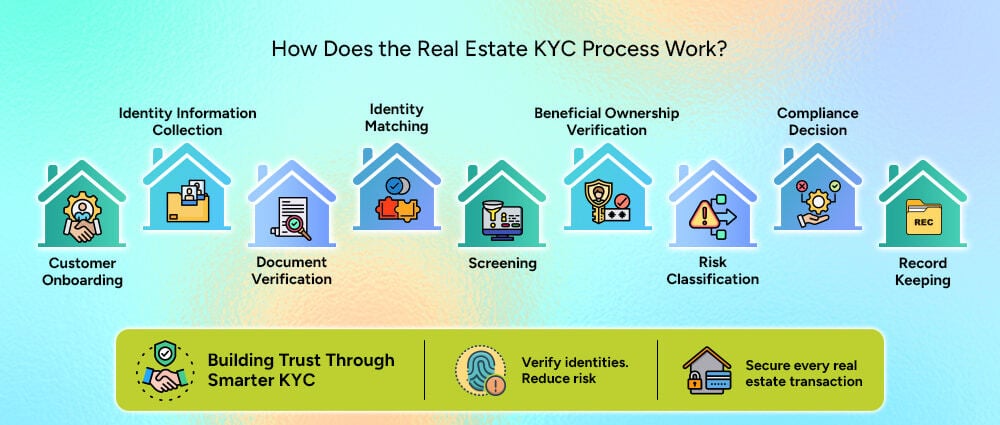
A good KYC process should be structured around the company’s customer journey rather than treated as a separate administrative task.
To start an application or transaction, the customer provides the needed information for verification. Digital forms can help users fill out the required fields and reduce incomplete submissions.
The business collects relevant information such as:
The KYC software can organize this information and pass it to the next stage without requiring employees to re-enter the same data.
After the customer submits a document, the system checks the details to make sure everything is in order. This can include the document type, expiry date, validity, and signs of alteration. OCR can also read the information on the document and reduce manual data entry.
After checking the document, the system makes sure it belongs to the customer. It can compare the customer’s face with the photo on their ID and check that they are a real person, not a photo or recording.
The system can check customer information against sanctions lists, PEP databases, watchlists, adverse media sources, and other relevant databases. If a match is found, the business can review the customer before moving forward.
When the customer is a company, the business needs to know who is behind it. This is important when the company is buying, selling, or holding a property.
The information collected can be assessed against predefined rules to determine whether a customer presents a low, medium, or high level of risk.
After the verification and screening checks, the business can decide how to proceed with the customer. The result may be an approval, a request for additional information, a manual review, or a rejection or escalation.
Businesses need to keep a record of the checks carried out during verification. This can include documents, screening results, decisions, timestamps, and actions taken by reviewers. The records should be stored securely and kept as long as required.
This makes KYC software useful beyond checking a customer’s identity. It also helps businesses keep track of what was checked and what happened during the process.
Manual KYC may work when a real estate business handles a small number of customers. Problems usually appear as transaction volume increases.
An employee may receive an ID by email, download it, check the document, enter the customer’s details into another system, perform separate database searches, record the outcome in a spreadsheet, and later search through emails when someone asks for the verification history.
When these tasks are handled manually for hundreds or thousands of customers, they can become difficult to manage. Businesses may face problems such as:
The problem is not necessarily that employees cannot perform these tasks. It is that repetitive processes consume time and create more opportunities for inconsistency. KYC software can take care of routine checks, leaving employees to focus on cases that need a closer review.
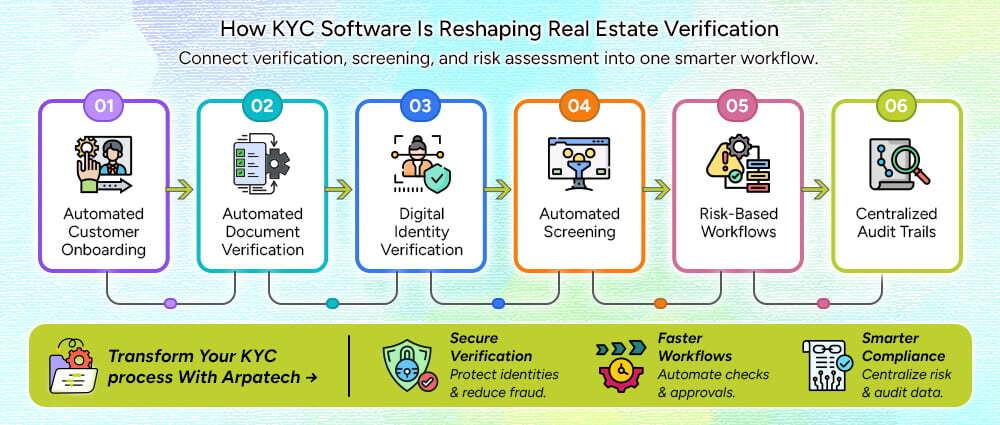
The strongest use of KYC software is not simply replacing a manual ID check. It is connecting several verification activities into one workflow.
Digital onboarding forms can collect information based on customer type. A buyer, corporate investor, or tenant can be presented with the fields and documents relevant to their situation.
Document recognition and OCR can extract information from IDs and supporting documents. The system can then compare that information against the customer’s submitted details and flag inconsistencies.
Identity verification services can be integrated into the workflow for facial matching, liveness checks, and other digital verification methods.
APIs can connect the platform with appropriate sanctions, PEP, watchlist, and adverse media providers. Instead of employees performing each search separately, results can flow into the customer’s case.
Rules can be configured to determine what happens next.
For example:
Low risk → automated approval
Medium risk → additional information
High risk → compliance team review
This approach helps teams spend their time on cases that require their attention.
Each verification case can have a record of the information submitted, documents checked, screening results, reviewer actions, and final decision. This gives the business a clear record of what happened during the verification process. This creates a much clearer history than scattered emails and spreadsheets.
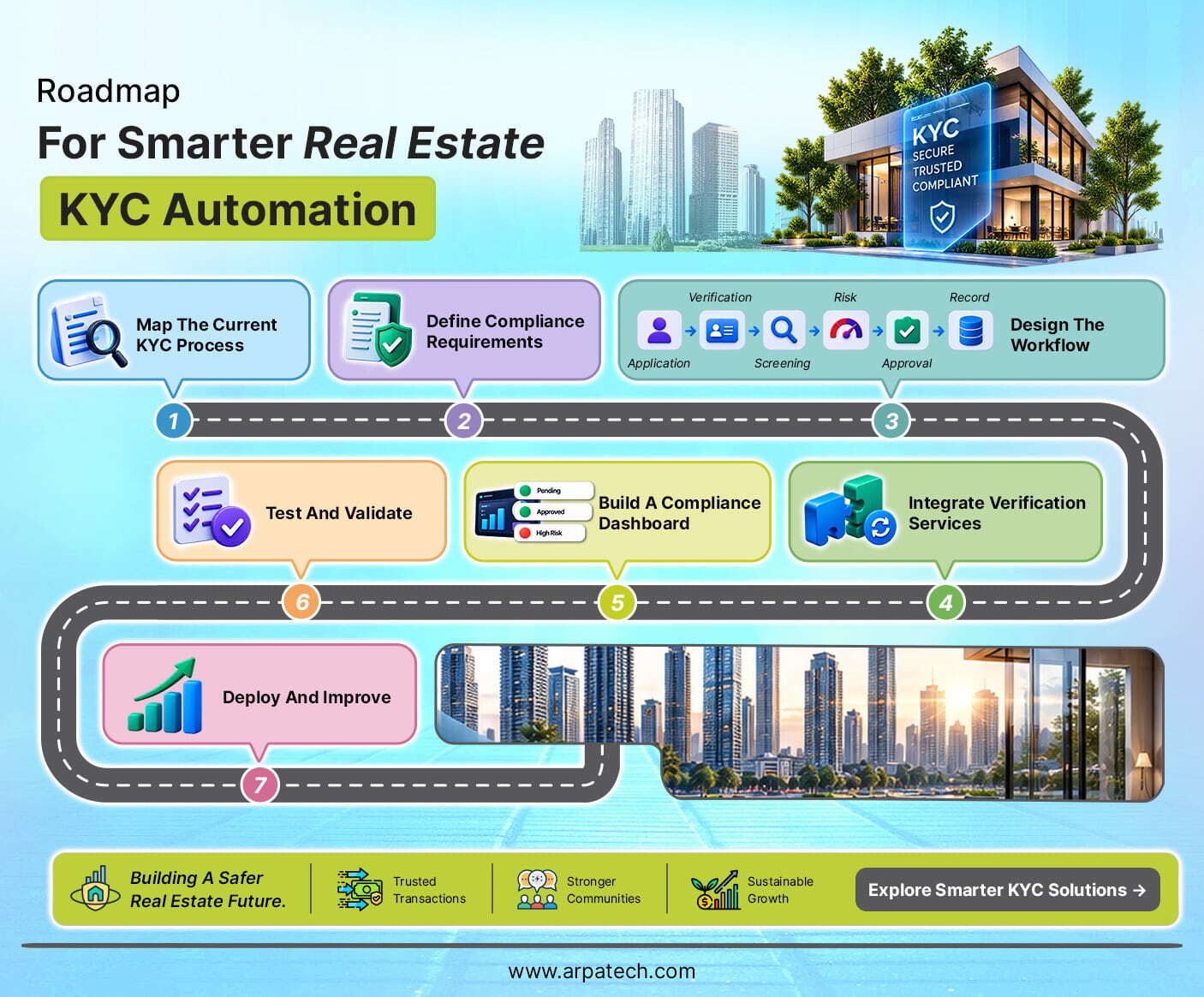
Building KYC software should begin with the existing business process, not with technology.
Start by documenting how a customer moves from application to approval. Look at the information and documents collected, the checks carried out, and the people involved at each stage.
Going through these steps can help you find unnecessary work and decide where automation would be useful.
Make a list of the rules that apply to the business and the customers it deals with. Note what information and documents need to be collected, which risk checks are needed, how long records should be kept, and when a case should be sent for further review.
The software should be built around these rules. It can help apply the company’s compliance process, but it should not make its own legal decisions.
Map the complete journey:
Application → Data Collection → Identity Verification → Screening → Risk Assessment → Review → Approval → Record Keeping
The goal is to make every stage clear, including what happens when a check fails.
Depending on the business model, integrations may include:
The technology partner should design these integrations around the company’s workflow rather than treating each service as an isolated tool.
Compliance teams need visibility into what is happening.
A dashboard can show:
This gives the team a quick view of the cases that are still in progress or need action.
Run different cases through the workflow, including incomplete applications, failed documents, identity mismatches, wrong alerts, risk cases, API failures, and manual decision changes. Review the results and see if anything needs to be changed. Make those changes before the workflow is put into use.
After testing the workflow, launch it. Monitor how long it takes to verify, how many customers complete the process, how often incorrect alerts occur, and how many cases need a manual review. Also, check for any compliance issues during this process.
Review what you find and make changes where the workflow is slow, causes problems, or needs more automation.
Selecting a technology partner is about more than finding a platform that can verify an ID. Look for a partner that can provide:
The partner should also understand that every real estate business has different customers, systems, risk policies, and operational processes.
The right KYC software should fit into that environment rather than forcing the business to redesign everything around a rigid platform.
KYC should not be treated as paperwork that simply needs to be completed before a property transaction can move forward. Done properly, it gives real estate companies a clearer understanding of who they are dealing with and creates a structured way to manage identity and transaction risks.
The right KYC software handles the main verification tasks in one place, from checking identities and documents to screening customers and reviewing risk. This makes the process easier to manage and gives teams a clear view of each customer’s verification status.
KYC helps real estate businesses verify who they are dealing with, but customer verification is only one part of financial crime compliance. Firms also need to understand transaction risks, identify suspicious activity, and take the right action when something looks unusual. This is where AML compliance becomes important.
If your real estate business still relies on disconnected tools or manual verification, Arpatech can help you build a secure, scalable solution around your existing workflows. Discuss how an automated KYC workflow can fit into your business.
Choose KYC software that keeps data secure and fits the way your business handles verification. It should connect with your existing CRM and compliance tools, while giving your team the ability to review risky or unusual cases.
Identity verification software checks a customer’s ID, matches their face with the photo on the document, and checks if a real person is present. The verified information can then be sent to the KYC software for screening and risk checks.
Automated KYC systems can help spot missing information, document issues, identity mismatches, and screening alerts during verification. Cases that need more attention can then be sent to the compliance team for review.
KYC software gives businesses a simpler way to check who they are dealing with and whether there are any risks involved. In real estate, this matters because a single transaction can involve large amounts of money, several people, and companies that may hide who owns the property.
In 2026, software needs to do more than handle basic tasks. It should be secure, scalable, and able to support automation, AI, and real-time data. For businesses handling customer information, KYC and AML compliance should also be part of the software.
Yes, the same KYC software can handle both individuals and businesses when it includes KYB capabilities. For businesses, it can check company information, documents, ownership details, and identify the UBOs behind the company. It can also help businesses understand more complex ownership structures.
Maheen Jilani
Sep 15, 2026

How Google Is Encouraging “Agentic Shopping”...
Have you searched for one item for hours and gone back and forth browsing between products endlessly? But in the end, even if you decided on a product, you weren’t satisfied with the price or the quality.
There were too many missing factors in order to determine the best product that would have lasted you years. In the end, you’re left with the fatigue of having twenty browser tabs open just to buy a pair of running shoes.
If only there were AI tools for ecommerce that would help you select the best product among thousands.
Well, today AI is starting to change that process, and Google is at the center of it. Instead of handing back a list of blue links, AI can now understand what a shopper actually needs in plain language.
We’re calling it “Agentic Shopping.”
An AI assistant can research products, compare options, spot better deals, track price drops, and even help finish the purchase. This is the idea behind agentic shopping, and it is quickly becoming one of the biggest shifts in ecommerce since mobile shopping took off.
Google is not treating this as just another chatbot experiment bolted onto Search. Its strategy pulls together Search, Gemini, Merchant Center, Google Ads, Google Pay, Google Wallet, product data, payment infrastructure, and a set of open protocols meant to connect retailers and AI agents. At the center of it all sits Google’s Universal Commerce Protocol, an open standard designed to create a shared language for agentic commerce across discovery, purchasing, and post-purchase support.
For a software company like Arpatech, this shift matters. It is not just a Google feature update. It signals a broader change in how ecommerce infrastructure needs to work. Google’s latest AI tools for ecommerce suggest that the future of online shopping will not simply involve people using AI to find products faster. AI agents themselves may become active participants in the shopping journey, and that creates real opportunities and real challenges for retailers, developers, and marketers alike.
Before diving into what Google has built, it helps to define the term everyone is suddenly using.
Agentic shopping refers to a shopping experience where AI can take actions on a consumer’s behalf, rather than just answering questions. It is the difference between an AI that talks and an AI that does.
For example, instead of asking a generic question like “what are the best running shoes,” a shopper using agentic AI tools for ecommerce shopping could say something closer to: “Find me a pair of running shoes under $150 that work for long-distance running, come in my size, and can arrive before Friday.”
From there, an AI agent could potentially:
It helps to see the difference side by side.
|
AI Shopping Assistant |
Agentic Shopping AI |
|
|
|
|
|
|
|
|
|
|
It is worth being honest here: true autonomy is still developing. Agentic commerce will likely exist on a spectrum for a while. Some experiences will require a shopper to approve a purchase before it happens, while others may become increasingly automated over time.
Google already sits at the beginning of a huge number of shopping journeys in the US. It has played a major role in product discovery for years through Search, Google Shopping, product listings, Google Ads, YouTube, Maps, and Merchant Center.
Google says people shop across its services more than a billion times a day, powered by its Shopping Graph, which now contains more than 60 billion product listings. That is the kind of stat that puts the scale of this shift into perspective. Very few companies have that kind of reach into everyday buying decisions.
The opportunity for Google is to move past simply helping people find products, and start connecting more of the full journey: intent, discovery, research, comparison, decision, purchase, and post-purchase support.
A good way to frame this is “from search engine to shopping agent.” Traditional search largely sends people away to other websites. Google agentic commerce flips that model. Instead of just pointing shoppers toward a retailer’s site, more of the decision-making and transaction process can now happen inside AI-powered interfaces like Gemini and AI Mode in Search.
This does not mean retailer websites disappear. In Google’s model, retailers stay the seller of record, while AI-powered surfaces help remove friction between discovery and checkout. It is less about replacing retailers and more about inserting a smarter layer between the shopper and the store.
This is arguably the most important piece of Google’s entire strategy, so it deserves a closer look.
The Universal Commerce Protocol, or UCP, is an open standard built to help AI agents, ecommerce businesses, consumer platforms, and payment systems talk to each other. Without a shared standard like this, every AI platform and every retailer would need separate, custom integrations, which quickly becomes unmanageable at scale.
Think of UCP as an attempt to create a common language for AI-driven commerce. Google says UCP is designed to support the entire journey, including discovery, buying, and post-purchase interactions, and it is built to work alongside existing technologies like Agent2Agent (A2A), the Agent Payments Protocol (AP2), and the Model Context Protocol (MCP).
Why does interoperability matter so much here? Picture an AI agent trying to check whether a product is in stock, verify its specifications, find alternatives, check loyalty benefits, apply a promotion, calculate delivery timing, complete a payment, and then track the order afterward. If every retailer and platform uses a completely different system for each of those steps, scaling this kind of experience becomes nearly impossible. That is the exact problem UCP is trying to solve.
The bigger takeaway is not just that Google built a protocol. It is that Google is trying to build an entire ecosystem around Google agentic AI and agentic commerce, one where competitors, payment processors, and retailers all have a reason to participate rather than compete against it.
Google’s push into agentic shopping is not one single feature. It is a collection of AI tools for ecommerce that work together, and it helps to break them down individually.
Conversational interfaces are changing how people search in the first place. Instead of typing something short like “best office chair,” a shopper can now type or say something closer to: “I work from home eight hours a day, have lower back pain, need adjustable armrests, and don’t want to spend more than $500.”
AI can interpret that entire context instead of relying purely on isolated keywords. Google is positioning AI Mode and Gemini as places where product discovery and shopping interactions increasingly happen, rather than simple side features attached to Search.
The key implication for ecommerce businesses is that optimization is starting to shift. It may increasingly involve optimizing for questions, context, and product attributes, not just keywords, which is a real change from how ecommerce SEO has worked for the last two decades.
Google’s Business Agent is a branded AI experience that lets shoppers interact directly with participating retailers through Search. It works something like a digital sales associate. It can help customers ask product questions, get recommendations, understand product details, explore related products, and get help in the retailer’s own brand voice rather than a generic AI tone.
Google has also signaled plans to expand these capabilities with retailer data, insights, offers, and purchasing functionality. For ecommerce businesses, this raises a bigger question than “how does my website chatbot work.” The real question becomes: how does my brand and product knowledge show up inside AI-powered shopping environments that I don’t fully control?
This part matters a lot for anyone working on ecommerce SEO or product data strategy. Google is rolling out additional Merchant Center data attributes built specifically for conversational discovery. These go beyond standard product titles and keywords to include things like:
This is a real shift in how retailers need to think about product data. In traditional ecommerce SEO, the goal was often matching the right keyword. In conversational commerce, businesses need product data that actually helps AI understand the product in context.
For example, instead of only optimizing for a phrase like “wireless headphones,” a retailer may need product data that explains who the headphones are suitable for, whether they work well for travel, how strong the noise cancellation is, battery life, device compatibility, alternatives, and common use cases. This is also where the best AI tools for ecommerce search analytics come into play, since retailers need visibility into how AI systems are actually representing their products before they can fix any gaps.
Google is also experimenting with Direct Offers, a way for advertisers to present relevant offers to shoppers who are close to making a purchase decision inside AI-powered experiences. Google may use AI to determine when a specific offer fits a user’s needs and shopping context.
This matters because advertising inside AI experiences is starting to look less like simply winning a keyword auction. It increasingly involves context, user intent, product relevance, purchase readiness, the offer itself, and value beyond just price. That is a meaningful shift for anyone running paid ecommerce campaigns in the US market.
Google has kept building on this strategy well past its initial announcement, most notably with Universal Cart, which is designed to make shopping across multiple retailers feel seamless.
Google’s vision here includes helping shoppers manage products from different merchants in one place and using AI to support tasks like monitoring shopping opportunities in the background. The broader idea is that traditionally, every retailer controls its own separate shopping journey. Agentic commerce introduces a more unified experience, where an AI layer helps coordinate the process across multiple merchants at once.
Historically, ecommerce companies have spent years fine-tuning product pages, add-to-cart buttons, checkout forms, and payment flows. In an agentic future, some of those steps may happen inside an AI interface instead of on a retailer’s own site.
That does not eliminate the importance of ecommerce websites. It does shift part of the competitive advantage toward things that live behind the scenes, including:
If AI is the one recommending products, incomplete or inaccurate data makes those products harder to understand and harder to recommend in the first place. Google has repeatedly emphasized how important strong product data is for AI-driven shopping experiences. Retailers need to think seriously about accurate titles, detailed descriptions, product specifications, availability, pricing, shipping information, compatibility, alternatives, and frequently asked questions.
SEO is not dead, but the field it covers is expanding. Businesses may need to optimize for conversational queries, product context, natural language questions, AI-generated comparisons, structured product data, and merchant feeds. Ranking for a keyword may no longer be the only goal. Being understandable and recommendable to an AI system could become just as important as ranking on a results page.
This is an important counterpoint that businesses should not ignore. When a shopper interacts through Google, Gemini, or another AI platform, the retailer does not control every step of the experience anymore.
The AI platform can influence which products get shown, how products are compared, which alternatives appear, when offers pop up, and where the actual transaction happens. That creates real tension between convenience for the shopper and control for the brand.
Agentic commerce is not only an AI problem. It is an infrastructure problem too. Retailers need systems that can reliably expose product data, inventory, pricing, order information, shipping options, loyalty benefits, and customer permissions to outside systems.
This is exactly where opportunities open up for ecommerce web development, API integration, cloud infrastructure, and AI implementation work, which is a space Arpatech and companies like it are well positioned to help with.
It is worth balancing the business perspective with the consumer side of this story.
On the upside, agentic shopping could mean less time spent researching products, more personalized recommendations, easier comparison shopping, faster checkout, better deal discovery, and help with repetitive shopping tasks that nobody actually enjoys doing. Instead of checking ten different websites for one specific laptop, a shopper could define their requirements once and let AI compare the suitable options for them.
But consumers will likely have real concerns too, including:
These concerns are exactly why trust and permission systems will matter so much as agentic AI shopping matures.
It would be misleading to suggest agentic commerce is already fully mature. It is not, and there are a handful of real challenges still ahead.
Trust and Permission: How much autonomy should an AI actually have? Should it be allowed to recommend, add items to a cart, apply a discount, or complete a purchase on its own? Where does the system need to stop and ask for human approval?
Payment Security: An AI agent spending money on someone’s behalf raises real questions about authorization and accountability. Google’s broader agentic commerce infrastructure includes work on payment protocols like AP2, while the wider industry is increasingly focused on making sure agents are properly authorized to act for the people they represent.
Data Accuracy: AI is only as useful as the information it can actually access. Incorrect prices or outdated inventory numbers could create serious customer experience problems, and possibly some very awkward customer service conversations.
Merchant Control: Retailers will need to decide how much control they are comfortable handing over to outside AI systems that they don’t fully own or manage.
Open Standards and Adoption: UCP’s long-term success depends entirely on adoption. An open standard only becomes powerful once retailers, payment providers, ecommerce platforms, and AI companies actually put it to use, rather than treating it as a nice idea on paper.
This is the part that matters most for anyone running or building for an online store right now.
A useful way to think about it: the businesses best prepared for agentic commerce may not be the ones that adopt the most AI tools for ecommerce business needs right away. They may simply be the ones with the cleanest data and the most connected commerce infrastructure underneath everything else.
This is worth sitting with for a moment. Google may be moving toward becoming a more active layer between consumers and retailers, not just a directory that points people elsewhere.
Traditionally, the path looked like this: consumer, then Google Search, then retailer website. The emerging model looks more like: consumer, then an AI interface, then an AI agent, then the retailer or commerce system on the back end. The key difference is that this middle layer can now understand intent, compare products, recommend choices, and potentially assist with the actual transaction, not just point in a general direction.
This does not necessarily mean Google replaces ecommerce businesses outright. It could instead become an increasingly important commerce orchestration layer sitting between shoppers and stores.
There are two sides worth weighing here. On the opportunity side, Google can send high-intent customers directly to retailers and reduce friction along the way. On the risk side, retailers may become more dependent on AI platforms for both discovery and transactions, which shifts some leverage away from the brand itself.
Agentic shopping is still in its early stages, and plenty of questions around trust, payments, privacy, retailer control, and interoperability remain unresolved. That is a fair and honest place to land.
That said, Google’s recent moves show the company is investing in far more than AI-generated product recommendations. Through UCP, AI-powered shopping experiences, Business Agent, Merchant Center updates, Direct Offers, and Universal Cart, Google is building the pieces of an ecosystem where AI can play a much larger role throughout the entire shopping journey, not just at the search step.
The biggest shift may not be that people start shopping with AI. Plenty of people already do that today. The bigger shift arrives when AI moves from helping people make decisions to actively helping them complete decisions they’ve already made.
For ecommerce businesses, the real question is no longer whether AI will affect online shopping. It already has. The question now is whether a business’s product data, technology, and customer experience are ready for a world where the next shopper might not be a person browsing a website at all, but an AI agent acting on that person’s behalf. That is exactly the kind of infrastructure and integration challenge Arpatech works with ecommerce brands to solve, from cleaning up product data to building the connected systems that agentic commerce will depend on.
Ramsha Khan
Aug 28, 2026

Recruitment Automation: A Complete Enterprise Guide for...
If you run talent acquisition at a US enterprise, you already know the numbers don’t look great. Applications are up, recruiter headcount is down, and everyone above you wants roles filled faster and cost-effectively.
According to SHRM’s 2025 Benchmarking Report, the average cost per hire for non-executive roles in the United States now sits at $5,475, while executive hires cost more than six times that amount. Time-to-fill keeps climbing too, even as job openings pile up.
This is exactly why recruitment automation has now become a boardroom priority. At Arpatech, we build software for companies that are tired of watching good candidates disappear into a slow, manual pipeline. This guide walks through what recruitment automation actually does, how to evaluate it, what it costs, what it saves, and how real enterprises are using it right now.
Recruitment automation is software that takes over the repetitive, rules-based parts of hiring so your recruiters can spend their time on the parts that actually require a human. Think resume screening, interview scheduling, candidate follow-up emails, status updates, and reference checks.
A good recruitment automation system uses workflows, triggers, and AI to move candidates through your pipeline without a person manually pushing every step.
Here’s how it works in practice. A candidate applies through your career site, the recruitment automation software immediately parses the resume, matches it against the job requirements, sends an acknowledgment email, and flags the best fits for recruiter review, all pretty fast.
If the candidate gets through the first screen, the system automatically sends scheduling links. It coordinates interviewer calendars, sends reminders, and logs the feedback once the interviews are done. None of this replaces the recruiter’s judgment on who to hire, by the way. It just removes the manual busywork that seems to take a recruiter’s whole day.
This is different from simply having an applicant tracking system (ATS). An ATS stores and organizes candidate data. Recruitment automation acts on that data, moving candidates forward, triggering communications, and surfacing the right people at the right time.
Many enterprises now treat automation of the recruitment process as the connective tissue between their ATS, their HRIS, and every other tool in their hiring stack.
US enterprise recruiting teams that adopt automation recruitment strategies consistently report gains in four areas:
Not all recruitment automation tools are built the same way, and enterprise buyers have very different requirements than a 20-person startup. Before you sign a contract, run any recruitment automation system through this checklist.
If a vendor can’t clearly answer questions in each of these categories, that’s a red flag, not a minor gap to work around later.
Every US enterprise buyer eventually has to justify this purchase to finance, and “it feels faster” doesn’t hold up in a budget meeting. Here’s how experienced HR leaders build the business case.
Start with the direct, measurable inputs:
Here’s a simplified example. Say your company makes 500 hires a year at an average cost-per-hire of $5,475, in line with the current SHRM benchmark. That’s roughly $2.74 million in annual hiring cost. If automation brings even a conservative 20% reduction in cost-per-hire, similar to the low end of the range reported across multiple 2026 industry studies, that’s over $547,000 in annual savings, before accounting for faster time-to-fill or reduced agency spend. Even a mid-six-figure software investment pays for itself quickly at that scale.
One of the biggest mistakes enterprises make is treating recruitment automation as a standalone tool bolted onto the side of their hiring process. It should sit inside a connected flow, moving data cleanly from the first candidate touchpoint all the way through to payroll.
A typical enterprise architecture looks like this:
In this flow, the career site kind of captures the candidate, then the ATS stores the application data. The recruitment automation layer screens, scores and routes the person, and it triggers the scheduling pieces too. After that, once the hire is made , the candidate’s information slides into the HRIS, which then feeds payroll setup , plus identity and access management for the day-one systems access.
When the whole chain is integrated the right way, a new hire can go from accepted offer to a working laptop and email account without any single manual data transfer, at all. When it’s not integrated, you end up with duplicate data entry , delayed start dates and honestly frustrated new employees on day one.
Automation touches sensitive candidate data, and US enterprises operate under real regulatory scrutiny here. This is not a section to skim; governance, risk, and compliance are important matters to take into consideration:
Any hr automation solutions vendor worth considering should be able to walk you through exactly how their platform handles each of these points, not just point to a generic compliance page.
There is no shortage of platforms claiming to be the best recruitment automation tools on the market. Here’s how some of the more established enterprise options generally stack up, based on how they’re commonly positioned in the market.
| Platform | Best For | AI Features | Enterprise Focus |
| Workday | Large enterprises already on Workday HCM | Skills-based matching, embedded AI recommendations | Very high |
| Greenhouse | Structured, data-driven hiring processes | Predictive analytics, DEI-focused reporting | High |
| Lever | Mid-market to enterprise, strong CRM | Candidate scoring, automated nurture campaigns | Medium-high |
| iCIMS | Complex, high-volume enterprise hiring | AI text recruiter, conversational sourcing | Very high |
| SmartRecruiters | Global enterprises needing flexibility | AI-driven candidate ranking | High |
| Ashby | Fast-growing tech companies | Built-in analytics and forecasting | Medium |
| Eightfold AI | Skills-based, talent intelligence | Deep-learning talent matching across the org | High |
| Phenom | Candidate experience and recruitment marketing automation | AI chatbots, personalized career sites | High |
| Paradox | High-volume, conversational hiring | Conversational AI assistant (Olivia) for scheduling | Medium-high |
When you’re evaluating a recruitment automation system, resist the temptation to pick the platform with the flashiest AI demo. Instead, map each option against the buying checklist above and against your specific hiring volume and complexity. A platform built for high-volume hourly hiring behaves very differently from one built for specialized technical recruiting.
Generic industry examples don’t tell you much. Here’s how recruitment automation actually plays out in specific, high-pressure enterprise hiring situations.
Hiring 1,000 warehouse associates before the holiday season. A national retailer needs to staff up distribution centers fast, with a hard deadline tied to peak shopping season. Manually screening and scheduling thousands of applicants in a few weeks is simply not possible with a normal recruiting team.
Automated screening filters candidates against basic requirements instantly, and self-service scheduling lets applicants book their own interview slots without a recruiter ever touching a calendar. This is where recruitment process automation earns its budget many times over.
Scaling engineering teams across multiple US states. A tech company hiring senior engineers in California, Texas, and New York simultaneously needs consistent screening criteria and compliant, state-specific offer processes. Automation handles the repetitive parts of coordinating interview panels across time zones and keeps every candidate’s status synced across recruiters, while automatically applying the correct compliance rules by state.
Campus recruiting for Fortune 500 organizations. Large enterprises running campus recruiting programs deal with thousands of applicants from dozens of universities in a compressed window each fall. Recruitment marketing automation software helps target the right student segments, automate event registration and follow-up, and keep candidates warm between the career fair and the final offer months later.
Healthcare systems filling nursing shortages. Hospital systems are competing for a shrinking pool of licensed nurses, often against travel nursing agencies offering premium pay. Automated sourcing that continuously scans for licensed, available candidates and instantly triggers outreach gives healthcare recruiters a meaningful speed advantage in a market where candidates accept offers within days, not weeks.
Franchise hiring across hundreds of locations. A quick-service restaurant brand with 400 franchise locations needs consistent, compliant hiring workflows at every site, without a corporate recruiter managing each one individually. Automation gives local hiring managers a self-service workflow while corporate retains visibility and reporting across every location.
Even well-funded enterprise rollouts of recruitment automation tools go sideways when teams skip a few basic steps. Watch for these:
It’s worth zooming out for a moment. Recruitment automation is really one piece of a much broader shift toward hr automation across the entire employee lifecycle. HR automation software now touches onboarding, benefits administration, performance reviews, and even offboarding. Enterprises that treat recruitment automation as an isolated tool tend to end up with disconnected systems down the line.
Enterprises that treat it as the front door to a broader hr process automation strategy tend to get a much cleaner data flow and a better experience for both recruiters and new hires. If you’re evaluating hr automation solutions more broadly, it’s worth starting the conversation with your recruiting stack, since that’s where the candidate relationship begins.
The enterprises that get the most value from recruitment automation don’t start by buying software. They start by mapping their current hiring workflow end to end and identifying exactly where recruiters are losing the most time to manual, repetitive tasks.
From there, the smartest path is usually incremental. Automate scheduling first. Then screening. Then candidate communication. Layer in AI matching once you trust the data flowing through the system.
If you’re evaluating recruitment automation software for your organization, start by pulling your current time-to-fill and cost-per-hire numbers, since you’ll need that baseline to measure real ROI later. Talk to your recruiters about where they actually lose their time each week, not where leadership assumes they lose it. And when you demo a platform, push vendors hard on integration, compliance, and security, not just how impressive the AI features look in a sales pitch.
At Arpatech, we work with enterprises building exactly this kind of connected, compliant, and genuinely useful hiring technology. If your recruiting process still runs on spreadsheets, manual scheduling, and disconnected systems, there’s no better time than now to change that. The enterprises that automate the right way this year will be the ones filling roles fastest next year.
Let’s Fix Your Hiring Process Today!
For mid-sized companies, the best recruitment automation platforms are those that combine applicant tracking, automated candidate screening, interview scheduling, and reporting in one place.
The right choice depends on your hiring volume, budget, existing HR tools, and the level of automation you need. A good platform should be easy for recruiters to use and flexible enough to grow with your company.
Small businesses should focus on tools that are affordable, easy to set up, and cover the essentials without unnecessary features. Compare options based on pricing, applicant tracking, resume screening, interview scheduling, integrations, and ease of use.
It is also worth checking whether the platform offers a free trial or flexible plans. Choose a tool that saves your team time without adding another complicated system to manage.
AI-powered recruitment software can automate tasks such as resume screening, candidate matching, job description creation, interview scheduling, and candidate communication. Popular options include Workable, iCIMS, Eightfold AI, and Greenhouse.
When comparing AI features, look beyond automation. Check whether the tool provides useful insights, supports fair hiring practices, protects candidate data, and allows recruiters to stay involved in important hiring decisions.
Start by identifying the biggest challenges in your current hiring process. Look for an ATS that can automate repetitive tasks, organize candidate information, simplify communication, and integrate with the tools your HR team already uses.
Also consider ease of use, scalability, reporting, security, and overall cost. The best ATS should make recruiting easier for your team, not create more administrative work.
Recruitment automation can help hiring teams in a lot of ways, which include:
Arpatech can also help businesses build and integrate technology solutions that support more efficient recruitment workflows.
Start small instead of trying to automate the entire recruitment process at once. Here’s what you can do:
It is also important to regularly review your automation workflows and results. Keep human oversight in important hiring decisions, monitor the quality of AI-generated recommendations, and make adjustments as your hiring needs change.
Ramsha Khan
Aug 12, 2026

Can AI Accelerate ESG Compliance in the Logistics Indus...
ESG reporting is no longer a “nice-to-have” checkbox for logistics companies operating in the United States. It has become a core business requirement. Customers want proof that their goods are moving through clean, ethical supply chains. Regulators want verified data, not estimates. Investors want to know that a company’s sustainability claims can actually hold up under scrutiny.
And yet, walk into the back office of many logistics companies today, and you will still find spreadsheets, disconnected software platforms, and teams manually pulling numbers together every quarter just to answer one simple question: how sustainable are we, really?
This is where artificial intelligence enters the picture, and not just as another automation catchphrase. AI is becoming the intelligence layer that helps logistics companies collect, analyze, verify, and report ESG compliance data faster and more accurately than any human team could manage alone.
So, can AI actually accelerate ESG compliance in logistics? The short answer is yes. But it only works when it is backed by quality data and properly integrated logistics systems. Bolting AI onto broken processes will not fix the problem. Used correctly, though, AI can turn ESG compliance from a painful, backward-looking chore into a real-time, forward-looking advantage.
The future of ESG in logistics is moving from once-a-year reporting toward continuous, real-time sustainability intelligence. So, today we will be discussing exactly how AI is reshaping ESG compliance software and why logistics companies in the US are under growing pressure to act now.
ESG regulatory compliance has moved from a European concern to a global one, and American logistics companies are feeling the effects even without a single unified federal ESG law. Supply chain transparency requirements are showing up in customer contracts, state-level disclosure rules, and international trade requirements that any company shipping goods overseas has to follow.
A few of the pressures driving this shift include:
This last point matters more than most logistics executives realize. Multinational shippers and large retail brands are increasingly requiring their logistics providers to share verified sustainability data before they will even sign a contract. If a trucking company or third-party logistics provider cannot produce accurate emissions numbers, they risk losing business to a competitor who can.
This is exactly why interest in ESG compliance consulting has grown so quickly. Companies know the stakes, but many do not know where to start, and that gap is exactly what AI-powered tools are now stepping in to close.
Before talking about solutions, it helps to understand why ESG regulatory compliance is so difficult for logistics companies in the first place. Logistics is a data-heavy industry, but that data is rarely organized in a way that supports clean sustainability reporting.
Common challenges include:
Put simply, ESG compliance software in logistics cannot succeed if it is bolted onto a foundation of scattered, inconsistent, manually collected data. That is the real problem AI needs to solve first and fast.
It is easy to assume ESG is mostly about emissions, but the “S” and “G” matter just as much, and AI has a role to play in both.
The environmental side of ESG is usually where logistics companies start, and for good reason. It is the most data-rich part of the framework, and it is where AI has the clearest, most immediate impact.
Every fleet, warehouse, and delivery route generates a steady stream of data that AI can turn into real insight, whether that means tracking emissions accurately or making a warehouse run on less power.
Here are some other ways AI is optimizing the Environmental side of supply chain and logistics:
This is also the area regulators and customers scrutinize most closely, so getting it right tends to set the tone for the rest of a company’s ESG program.
The social pillar is where AI starts to touch people directly, not just fuel gauges and energy meters.
This is where driver and warehouse worker safety has always mattered, but proving that a company actually monitors and improves working conditions is a different challenge, one that used to depend on incident reports filed after the fact.
AI changes this by watching for warning signs before something goes wrong, whether that is a driver showing signs of fatigue or a warehouse zone with a pattern of near-misses. Some other ways AI is advancing on the social side are:
This kind of proactive monitoring is also what makes social reporting far more credible to regulators, customers, and employees themselves.
Governance is often the least talked about part of ESG, but it is arguably the part that holds everything else together. Without strong governance, even accurate environmental and social data can lose credibility, because there is no clear system showing how that data was collected, checked, or reported.
AI helps here by creating consistent audit trails, flagging irregularities before they become bigger problems, and keeping compliance monitoring running continuously instead of relying on a once-a-year review. These are other ways AI is helping companies automate governance regulations:
For companies trying to stay ahead of shifting ESG standards, this kind of built-in governance is what makes ESG reporting defensible under scrutiny.
Rather than focusing on specific vendors, it helps to think about AI’s role in ESG through four broad categories of use.
Fleets are often the single biggest source of emissions and operational cost in a logistics business, which makes them a natural starting point for AI-driven ESG improvements.
Instead of treating fuel use, driver behavior, and maintenance as three separate problems, AI ties them together into one continuous feedback loop. A driver’s habits affect fuel burn, fuel burn affects emissions data, and maintenance timing affects how efficiently the whole vehicle runs. Managing all three with AI, rather than reacting to each one separately, is what turns a fleet from a compliance liability into a genuine sustainability asset.
Warehouses tend to get less attention than fleets in sustainability conversations, but they are significant energy consumers in their own right. AI-driven warehousing focuses on matching energy use to actual need, rather than running lighting, equipment, and climate control on fixed schedules regardless of demand.
This same intelligence extends to inventory, where better forecasting means fewer overstocked items sitting unused and less waste overall. Together, these improvements make warehouses a much stronger contributor to a company’s sustainable logistics and supply chain management goals.
ESG risk rarely stays contained within a single company. It travels through suppliers, carriers, and partners, which is exactly why visibility matters so much.
AI makes it possible to track shipments, monitor supplier certifications, and calculate emissions across multiple transportation modes all in one connected view, rather than piecing together updates from separate systems.
This kind of visibility also means risk alerts can surface early, giving teams time to respond to a compliance issue or disruption before it escalates into a bigger problem for the whole supply chain.
All the data collection and monitoring in the world does not help much if it never reaches the people who need to act on it. This is where ESG reporting platforms come in, pulling live data from operational systems and turning it into dashboards that different audiences can actually use.
Operations teams need day-to-day KPI tracking, compliance teams need reporting formatted to specific regulatory requirements, and executives need a clear, high-level summary they can bring to the board.
AI-powered reporting platforms are built to serve all three audiences from the same underlying data, instead of requiring separate reports built by hand for each one.
Here is the good news: logistics companies already generate enormous amounts of operational data every single day. Every mile driven, every gallon of fuel burned, every warehouse light left on, and every shipment tracked creates a data point. The problem has never been a lack of data. It has been a lack of a system smart enough to turn that data into something usable.
That is exactly the gap AI in logistics is built to fill.
Instead of manually calculating emissions every quarter using outdated spreadsheets, AI can automatically pull data from multiple sources at once, including:
Once this data is connected, AI can handle CO2 estimation, fuel consumption analysis, route-based emissions calculations, and vehicle efficiency scoring, all continuously and automatically. This alone turns what used to be a multi-week manual process into something closer to a live dashboard.
This is one of the most powerful and immediate ways AI supports green logistics. AI-driven route optimization can:
This directly supports ESG environmental goals while also lowering fuel costs and improving fleet utilization. It is one of those rare wins where sustainability and cost savings point in exactly the same direction.
According to a white paper published by the World Economic Forum in partnership with McKinsey & Company, titled “Intelligent Transport, Greener Future,” AI-enabled optimization could reduce total emissions from freight logistics by roughly 10 to 15 percent. The paper breaks this down further, noting that AI-driven route optimization and asset management alone can achieve up to a 7 percent reduction in emissions by using real-time data and predictive analytics to make every trip more efficient.
For an industry where freight logistics alone contributes close to half of all transport-related greenhouse gas emissions globally, a 10 to 15 percent reduction is not a small win. It is a meaningful step toward real decarbonization, and it comes from better use of data that companies are often already collecting.
Sustainable logistics and supply chain management does not stop at the truck. Warehouses are massive energy consumers, and AI is increasingly being used to optimize:
The result is a meaningful drop in electricity consumption, a smaller carbon footprint, and cleaner data for sustainability reporting. When warehouse energy data is automatically logged and analyzed, ESG teams no longer have to chase down utility bills from a dozen different facilities.
Reactive maintenance, where trucks and equipment are only serviced after something breaks, is expensive and inefficient. AI-powered predictive maintenance flips this model by using sensor and performance data to predict issues before they happen, including:
The benefits go well beyond convenience. Well-maintained vehicles run more efficiently, which improves fuel efficiency and extends vehicle lifespan. Fewer breakdowns mean fewer emergency repairs, fewer emissions from poorly running engines, and lower overall maintenance costs. For fleet managers focused on ESG risk management, predictive maintenance is one of the simplest ways to reduce both operational risk and environmental impact at the same time.
Supply chains are only as strong as their weakest link, and this is especially true for ESG risk and compliance. AI can continuously scan and analyze:
Instead of relying on an annual supplier questionnaire that may already be outdated by the time it is reviewed, AI-driven monitoring allows logistics companies to identify supply chain ESG risks much earlier. This is a major upgrade for companies trying to get ahead of ESG regulatory compliance requirements rather than reacting to them after a problem becomes public.
Finally, AI is dramatically speeding up the paperwork side of ESG compliance software. This includes helping teams produce:
Work that used to take weeks of manual effort, pulling numbers from different departments and cross-checking calculations by hand, can now be compiled, validated, and formatted in a fraction of the time.
It is worth stepping back and reframing the conversation here. ESG compliance should not be viewed purely as a regulatory obligation that companies grudgingly satisfy. When done well, it becomes a genuine competitive advantage.
Logistics companies that invest in AI-powered ESG compliance software tend to see benefits including:
In other words, sustainability in logistics and strong financial performance are no longer opposing goals. They are increasingly the same goal, approached from two different angles.
None of this is to suggest that adopting AI for ESG compliance is simple. There are real challenges that logistics companies need to address honestly.
Data Quality
AI is only as effective as the data it receives. If fuel records are incomplete, if telematics data is inconsistent, or if warehouse energy usage is not properly tracked, AI will produce flawed or incomplete results. Garbage in, garbage out still applies, no matter how advanced the model is.
System Integration
Many logistics companies still operate on a patchwork of legacy ERP systems, older warehouse management software, separate fleet management platforms, and multiple data silos that were never designed to communicate with each other. Getting these systems to share data cleanly is often the hardest and most time-consuming part of any AI-driven ESG initiative.
Changing Regulations
ESG regulations are not static. Reporting frameworks, disclosure requirements, and ESG standards continue to evolve at both the state and federal level, as well as internationally for companies with global supply chains. AI models and reporting templates require continual updates to stay aligned with these shifting requirements.
Governance and Human Oversight
Finally, AI should never operate as a total black box, especially when the output feeds directly into regulatory disclosures. Logistics companies need to prioritize:
AI should accelerate the work. It should not replace human judgment on decisions that carry legal and reputational weight.
For logistics companies ready to move forward, a phased and practical approach tends to work best. Consider the following steps:
This is often exactly where ESG compliance consulting becomes valuable, helping companies figure out which systems need to be connected first and which AI tools will actually solve their specific bottlenecks, rather than adopting technology for its own sake.
Looking ahead, the direction of travel is clear. ESG compliance is shifting away from a once-a-year reporting exercise and toward continuous, real-time intelligence.
Emerging trends worth watching include:
As the World Economic Forum’s research on AI and freight decarbonization makes clear, the technology is no longer just theoretical. Companies are already using AI to make measurable progress on emissions today, not years down the road. The next phase of this shift is AI evolving from a reporting assistant into a genuine decision-making partner for logistics operations, one that does not just tell companies what happened last quarter, but helps them make better sustainability decisions in the moment.
At Arpatech, sustainability is something we actively build for, not just something we help clients report on. We have partnered with multiple companies putting real technology behind their environmental goals.
For one of our clients, we helped build a free mobile app that connects to a driver’s vehicle and shows them how their driving habits impact the environment, helping people make small, practical changes since its launch in 2021.
On another occasion, we worked for a California-based client encouraging the adoption of electric vehicles by rewarding smarter, more sustainable mobility choices. Both projects reflect what we believe drives real environmental progress: good intentions backed by the right technology.
ESG compliance in logistics is only getting more complex. Regulations are expanding, customer and investor expectations keep rising, and the sheer volume of operational data companies generate every day continues to grow. Trying to manage all of this manually, through spreadsheets and disconnected systems, is no longer a realistic long-term strategy for any serious logistics operation.
AI offers a genuine way forward. It helps companies move beyond manual, backward-looking reporting by automating emissions tracking, optimizing routes and warehouse energy use, predicting maintenance needs, monitoring supplier risk, and speeding up the documentation that regulators and customers demand. It supports the full ESG picture, not just environmental metrics, but social and governance priorities as well.
None of this happens automatically, though. It requires clean data, integrated systems, and continued human oversight to make sure AI-driven ESG reporting is accurate, explainable, and trustworthy. Companies that get this foundation right and invest in AI-powered ESG capabilities today will be far better positioned to reduce their compliance burden, run more efficient operations, and build supply chains that are genuinely more sustainable and resilient in the years ahead.
At Arpatech, we work with logistics and supply chain companies to build the software development foundation that makes this possible, connecting fragmented systems, automating data collection, and turning ESG compliance from a quarterly scramble into a real-time capability.
Ready to turn ESG compliance into a competitive advantage? Let’s bring AI into your sustainability strategy. Reach out to Arpatech and let’s talk about what’s possible.
The best ESG compliance software connects fleet, warehouse, and ERP data into one system so emissions and compliance data update automatically instead of being tracked by hand.
Arpatech builds custom software solutions like this for logistics companies looking to automate ESG data collection and reporting rather than relying on generic, one-size-fits-all tools.
ESG compliance in logistics means meeting environmental, social, and governance standards across operations, from tracking fleet emissions and warehouse energy use to ensuring driver safety and transparent reporting.
It has become a requirement for working with major shippers and retailers, not just a regulatory formality.
Start by cleaning up and centralizing your data, then integrate fleet, warehouse, and ERP systems so information flows automatically.
From there, automate data collection before automating reporting, and keep humans involved for final review. Arpatech helps logistics companies build this kind of connected system from the ground up.
Logistics companies commonly report against frameworks tied to Scope 1, 2, and 3 emissions, along with broader disclosure standards used for investor and regulatory reporting.
The right framework often depends on company size, region, and customer requirements, so it’s worth confirming current standards with a compliance professional.
Good ESG consulting for logistics firms focuses on data readiness, system integration, and aligning reporting with current regulations, not just generic sustainability advice.
Arpatech supports this work from the technology side, helping companies build the software backbone that makes accurate ESG reporting possible.
Several consulting firms offer ESG compliance services tailored to mid-sized companies, and the right fit usually depends on industry, region, and reporting needs.
It’s worth comparing a few firms directly to see which understands logistics-specific challenges like fleet emissions and supplier data gaps. Our teams at Arpatech can also help you figure out the best solutions for your business, just leave us a message and an expert will reach out to you.
Supply chain ESG risk tools typically monitor supplier certifications, environmental incidents, and compliance disclosures in real time, rather than relying on annual questionnaires.
Arpatech develops software that supports this kind of continuous risk monitoring as part of a broader ESG compliance system.
Ramsha Khan
Jul 29, 2026

Before we begin, please solve this quick math check to confirm you're human, and you'll be all set to start chatting with our AI assistant.
Stay connected with us to receive the latest information, updates, and insights from our world of innovation.
By entering your email address you will receive promotional updates.


© 2026 ARPATECH (ADVANCED RESEARCH PROJECTS & TECHNOLOGY)


